Topic
Getting access, staying authorized, and pulling data out of Amazon's Selling Partner API without tripping over its quirks — reports, tokens, rate limits, order data, and the deprecations coming down the line.
14 guides, written from real builds.
SP-API is the interface to a seller's own operational data — orders, fees, settlements, reports. The hard part is almost never the HTTP call. It is that a successful request depends on four separate things agreeing — the role granted to your app, the regional endpoint you hit, the seller authorisation behind the refresh token, and sometimes a second short-lived token on top of the first — and when any one of them is wrong, Amazon returns the same 403 for all of them.
The five things that actually go wrong
- Auth is layered, not single. Credentials, roles, region and seller consent are four failure points wearing one error message.
- The useful data is asynchronous. Reports make you create a job, poll it, fetch a document, then decompress what comes back.
- Field names overpromise. A column called net proceeds is not profit, and a list price is not the price the buyer paid.
- Identifiers are less unique than they look. Assumptions you bake into a schema surface as corruption months later.
- The surface moves. Endpoints you depend on already have published removal dates.
Getting in, and staying in
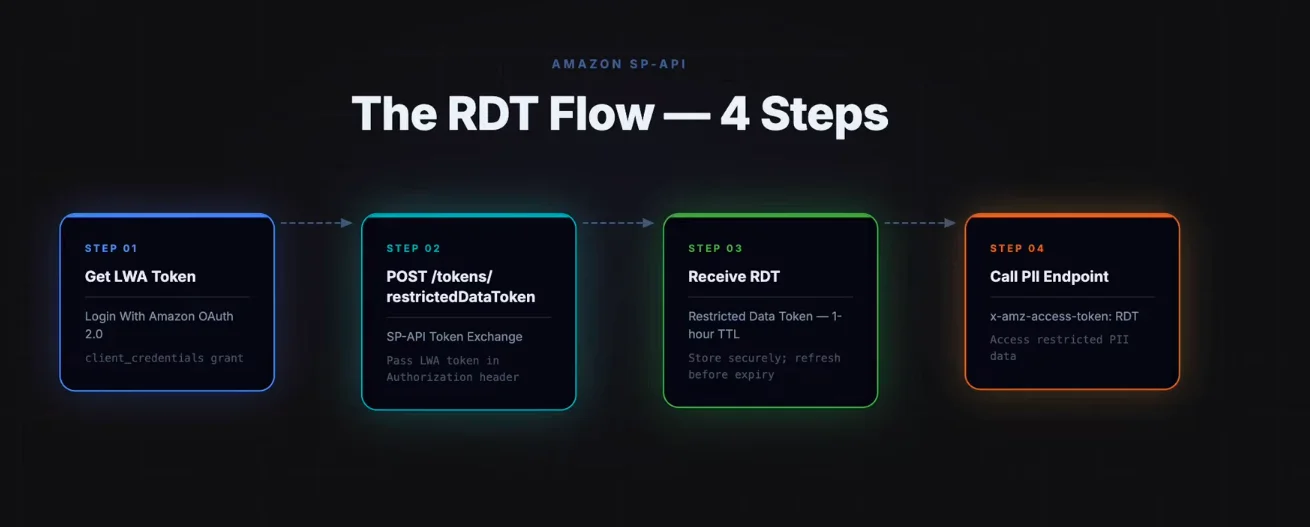
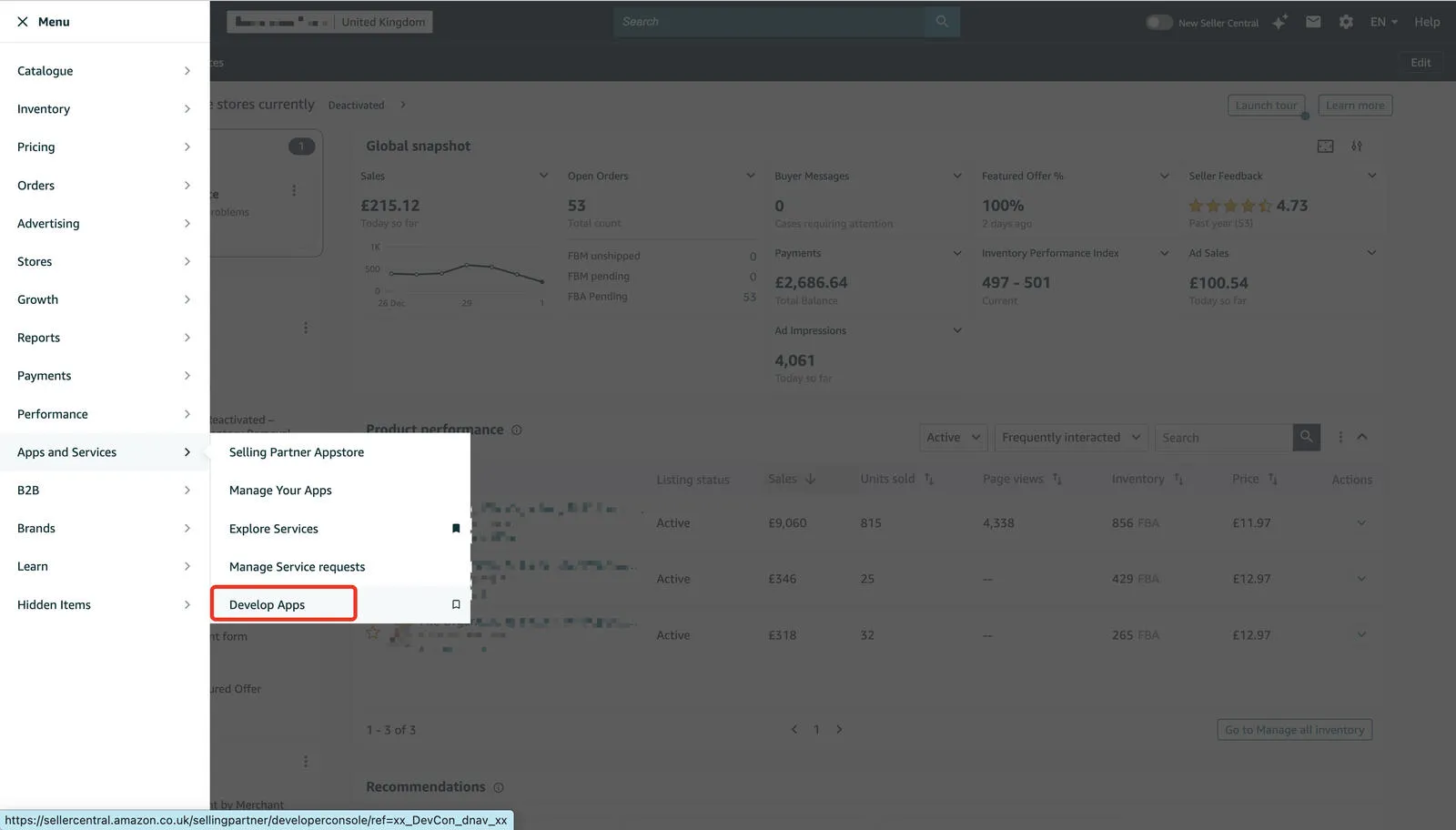
If you only need your own account, the short path is creating an app client under Develop Apps in Seller Central — pick roles, take the Client ID and Secret, self-authorize, keep the refresh token. If other sellers will authorize your app, you need a verified developer profile first, and the Solution Provider Portal walkthrough covers registration, LWA credentials, redirect URIs and the OAuth handoff. When a call that should work returns access denied, work through the eight causes of an SP-API 403 in triage order rather than regenerating tokens. Buyer name coming back null is a different mechanism: that is PII gating, and the Restricted Data Token flow explains the roles, the app-level gate and the dataElements trap.
Pulling data out
Start with the four-step Reports pattern: create, poll, fetch document, decompress. Most broken integrations either expect rows back from the create call or poll themselves into a throttle. In Data Kiosk, the economics dataset writeup shows why costOfGoodsSold is null on every row and what net proceeds actually adds up to. For Amazon Custom sellers, buyer personalisation text is not in getOrders at all — it sits behind a restricted endpoint, inside a ZIP, with a payload version that silently drops the text.
When the numbers don't agree
Right order count, wrong revenue is the classic support ticket, and the seven ways a dashboard drifts from Seller Central map each SP-API figure to its Seller Central counterpart and give you a reconciliation loop. Before that, check your schema: an order ID identifies a buyer's order, not a row you own, so a UNIQUE constraint on it loses real orders once you sync a second seller account. And put the deprecation calendar in your roadmap — settlement flat files go first in November 2026, then Orders v0, then Finances v0.
The gaps
Part of the job is building what Amazon does not offer. There is no seller demand-forecast endpoint, so you compute velocity from your own order history. Buy Shipping does not cover international shipments, and exporting cross-border means going straight to a carrier and rebuilding what Buy Shipping gave you, seller protection included. Review requests do have an API, though the Solicitations endpoint needs a role you probably lack and a delivery window you cannot observe. On the 1P side, the vendor family covers retail analytics, purchase orders, ASNs and invoices. And for listing content, generating copy from the actual product photographs beats generating it from a title.
The triage orders, formulas and schemas here came out of client builds rather than docs reads. Building this sort of integration is the work I take on.
Shahzeb Khan runs Databaaba, a one-person studio that builds amazon sp-api integrations
for sellers, agencies, and software teams. Every guide here came out of a real client build.