Why Your Buyer Name Comes Back Null #
You call getOrders on Amazon's SP-API. The order comes back. The SKU is there, the quantity is there, the marketplace is there — and then you look at the buyer:
"BuyerName": null,
"ShippingAddress": null
That isn't a bug. Amazon hides this data on purpose. It's PII — personally identifiable information — and a regular SP-API access token is not allowed to see it. To unlock it, you need a completely different kind of token: the Restricted Data Token, or RDT.
Companion video: This guide is the written companion to the YouTube video "SP-API PII: Unlock Buyer Details With Restricted Tokens" (embedded above). The Python demo and all SPP screenshots come from a real, live seller account.
What Counts as PII in SP-API #
PII is anything Amazon considers private about the buyer. In SP-API terms, this includes:
- Buyer name
- Shipping address (street, city, postal code, country)
- Buyer email address
- Tax information (in some markets)
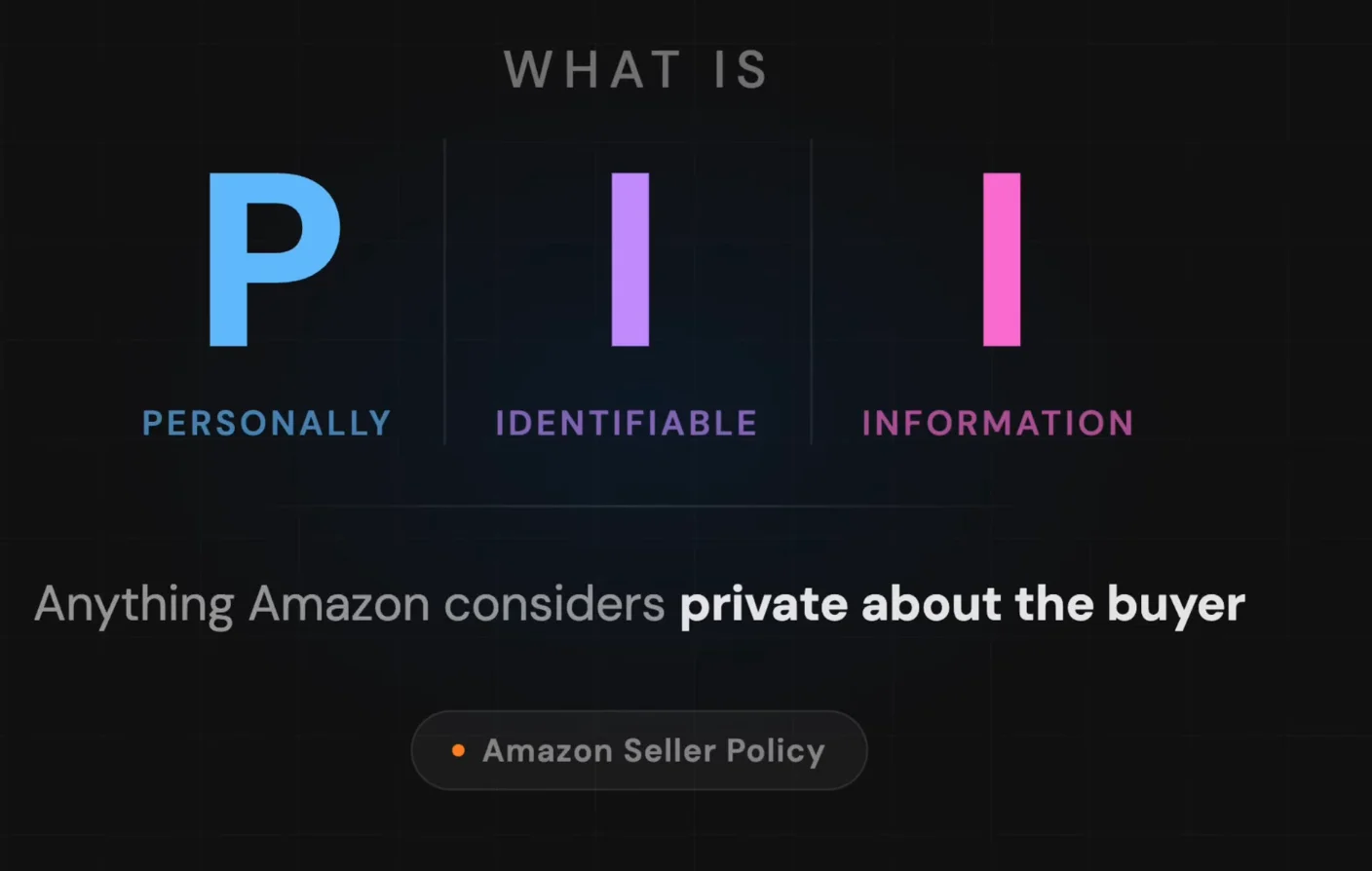
Order-level data (SKU, ASIN, quantity, marketplace ID, order ID, status) is not PII. That data is yours all day with a regular access token. The split happens the moment you ask for anything that identifies the human on the other end of the order.
Why Amazon Gates This Data So Hard #
Amazon doesn't gate PII to make your life difficult. They gate it because they got burned. Sellers were leaking buyer data, third-party apps were storing addresses indefinitely, and tax info was sitting in unencrypted databases. Eventually regulators started asking very loud questions.
That's why getting access to PII feels like applying for a security clearance. Because, in a way — it kind of is.
How the Restricted Data Token Actually Works #
An RDT is a short-lived access token that only works for restricted operations. It's not a replacement for your normal access token — it's a second, narrower token used only when you cross into PII territory.
The flow has four steps:
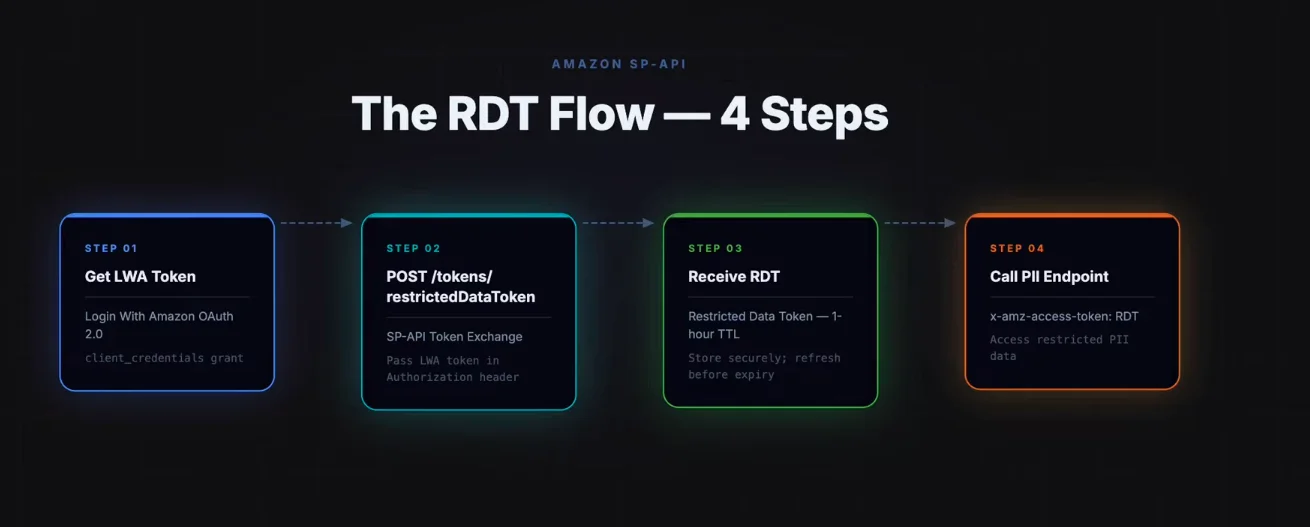
- Get your LWA access token — the same client_credentials grant you already use for every other SP-API call
- POST to
/tokens/2021-03-01/restrictedDataToken— pass the LWA token in the Authorization header, tell Amazon which restricted operation you're about to call - Receive the RDT — a short-lived token (1-hour TTL) scoped to exactly the operations you specified
- Call the PII endpoint — pass the RDT in
x-amz-access-tokeninstead of your LWA token
Two tokens. Normal endpoints get the normal one. Restricted endpoints get the restricted one. That is the entire mental model.
The Three Restricted Roles That Unlock Buyer Data #
Before you can mint an RDT, your developer profile needs an approved restricted role. Amazon publishes the official mapping of role → operation → data element at developer-docs.amazon.com/sp-api/docs/roles-in-the-selling-partner-api — bookmark it, you'll be back there a lot.
The three roles that matter for buyer PII:
- Direct-to-Consumer Shipping — unlocks shipping address for sellers fulfilling orders themselves (non-FBA). If you're building a custom fulfillment flow, this is your role.
- Tax Invoicing — unlocks buyer name + shipping address for generating legal invoices. Required in the EU, Mexico, and any VAT market. Most commonly used.
- Tax Remittance — unlocks data needed for tax filing and remittance reports.
If you operate in the EU, in Mexico, or any market where the seller has to issue a legal invoice — you legally have to put the buyer's name and address on the invoice. Amazon's restricted role for that exact use case is Tax Invoicing. This is the role most sellers I work with end up applying for, because invoicing happens per order while remittance happens per period.
Applying for a Restricted Role in SPP #
Open the Solution Provider Portal (SPP) developer profile, find the Roles and Data Elements section, and tick the restricted role you want.
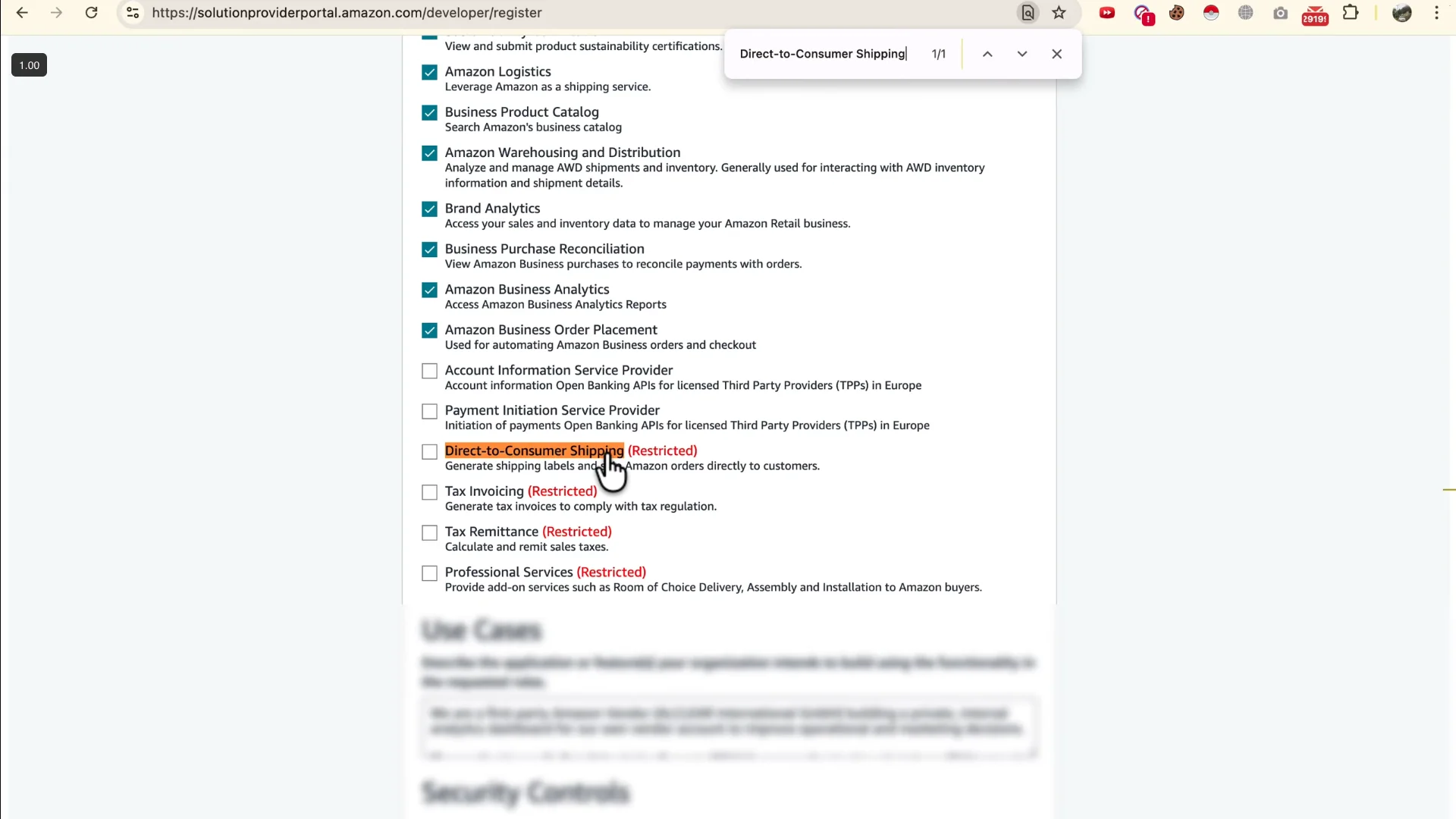
The second you tick a restricted role, the page expands. A whole new questionnaire appears underneath — for every restricted role you select, the portal injects a context-specific questionnaire.
The questions are about:
- How you'll use the PII data
- Where you'll store it and for how long
- Who inside your organisation has access
- What security controls are in place
Answer honestly and specifically. Vague answers get rejected. "We store it securely" gets rejected. "We store buyer PII in an AES-256 encrypted RDS instance accessible only by our invoicing service, purged after 90 days" gets approved.
Approval is not instant. Restricted role reviews can take days to weeks depending on the role and market. Apply before you need it — not the day before your integration goes live.
The App-Level Gate Everyone Misses #
This is the step that ruins more SP-API integrations than any other. Having an approved role on your developer profile is only half the job. You also have to attach that role to your specific application — and they are two completely separate gates.
In SPP, go to your application, open it, and scroll to the roles section. You'll see the restricted role you applied for. Tick it there too. Then re-list the application — this forces sellers who already authorised your app to re-authorise, which generates a new refresh token that includes the restricted scope.
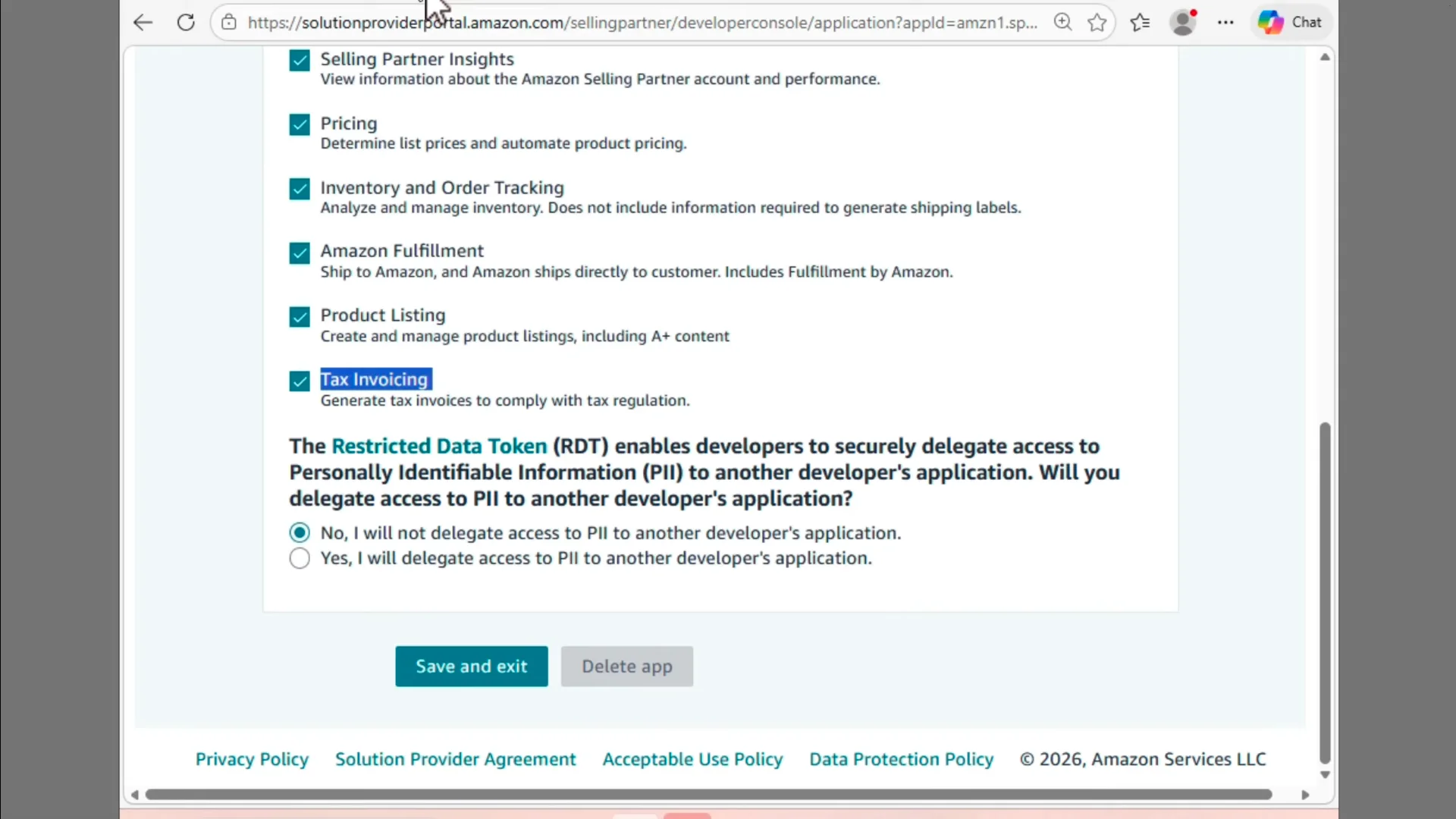
There is also a question on the app page: "Will you delegate access to PII to another developer's application?" For most builds, the answer is No. If you're building a connector platform where third-party devs call your API to get PII, it's Yes — but that's a separate data-sharing agreement conversation with Amazon.
The 403 fix: If you skip the refresh-token regeneration step, your code will hand back a perfectly clean RDT and then immediately 403 on the actual PII call. The error reads "Application does not have access to one or more requested data elements". The fix is always the same — re-list the app, get a new refresh token, retry.
The dataElements Gotcha (Read This Before You Write Any Code) #
Here is the single most-undocumented behaviour in the entire Tokens API. When you call createRestrictedDataToken for these specific per-order PII endpoints:
GET /orders/v0/orders/{orderId}/addressGET /orders/v0/orders/{orderId}/buyerInfoGET /orders/v0/orders/{orderId}/orderItems/buyerInfo
Do not pass dataElements.
These endpoints do not accept the dataElements parameter. If you pass it, Amazon mints you a token with zero effective scope. The mint call succeeds — you get a token back — but the token is useless. Every call you make with it returns a 403.
The dataElements parameter is only for the bulk order endpoints (getOrders, getOrderItems) where you can request PII inline. For per-order endpoints, omit the field entirely.
# WRONG — don't do this for per-order endpoints
restricted_resources = [
    {{
        "method": "GET",
        "path": "/orders/v0/orders/302-XXXXXXX/address",
        "dataElements": ["buyerInfo", "shippingAddress"]  # Remove this line
    }}
]

# CORRECT — omit dataElements for per-order PII endpoints
restricted_resources = [
    {{
        "method": "GET",
        "path": "/orders/v0/orders/302-XXXXXXX/address"
    }}
]
Working Python Demo #
Here's a working demo using python-amazon-sp-api. It pulls 3 recent shipped orders from the DE marketplace, mints an RDT for each, and prints the buyer name + shipping address.
📦 Full demo on GitHub: github.com/shahzebkhanyusfzai/sp-api-rdt-demo — clone it, drop your credentials into .env, and run.
Minting the RDT:
from sp_api.api import Tokens, Orders
from sp_api.base import Marketplaces

def mint_rdt_for_order(order_id, credentials):
    tokens_client = Tokens(credentials=credentials, marketplace=Marketplaces.DE)
    restricted_resources = [
        {{"method": "GET", "path": f"/orders/v0/orders/{{order_id}}/address"}},
        {{"method": "GET", "path": f"/orders/v0/orders/{{order_id}}/buyerInfo"}},
    ]
    response = tokens_client.create_restricted_data_token(
        restrictedResources=restricted_resources
    )
    return response.payload["restrictedDataToken"]
The flow in the full script:
- Fetch a list of shipped orders with a regular Orders client (no RDT needed yet — order IDs aren't PII)
- For each order, call
mint_rdt_for_order - Instantiate a new Orders client, passing the RDT as the access token override
- Call
/orders/v0/orders/{orderId}/addressand/orders/v0/orders/{orderId}/buyerInfo - Print results
One gotcha in python-amazon-sp-api: to pass a custom access token, you need to construct the client with access_token=rdt in the credentials dict rather than letting the library auto-refresh. The full demo shows exactly how to do this.
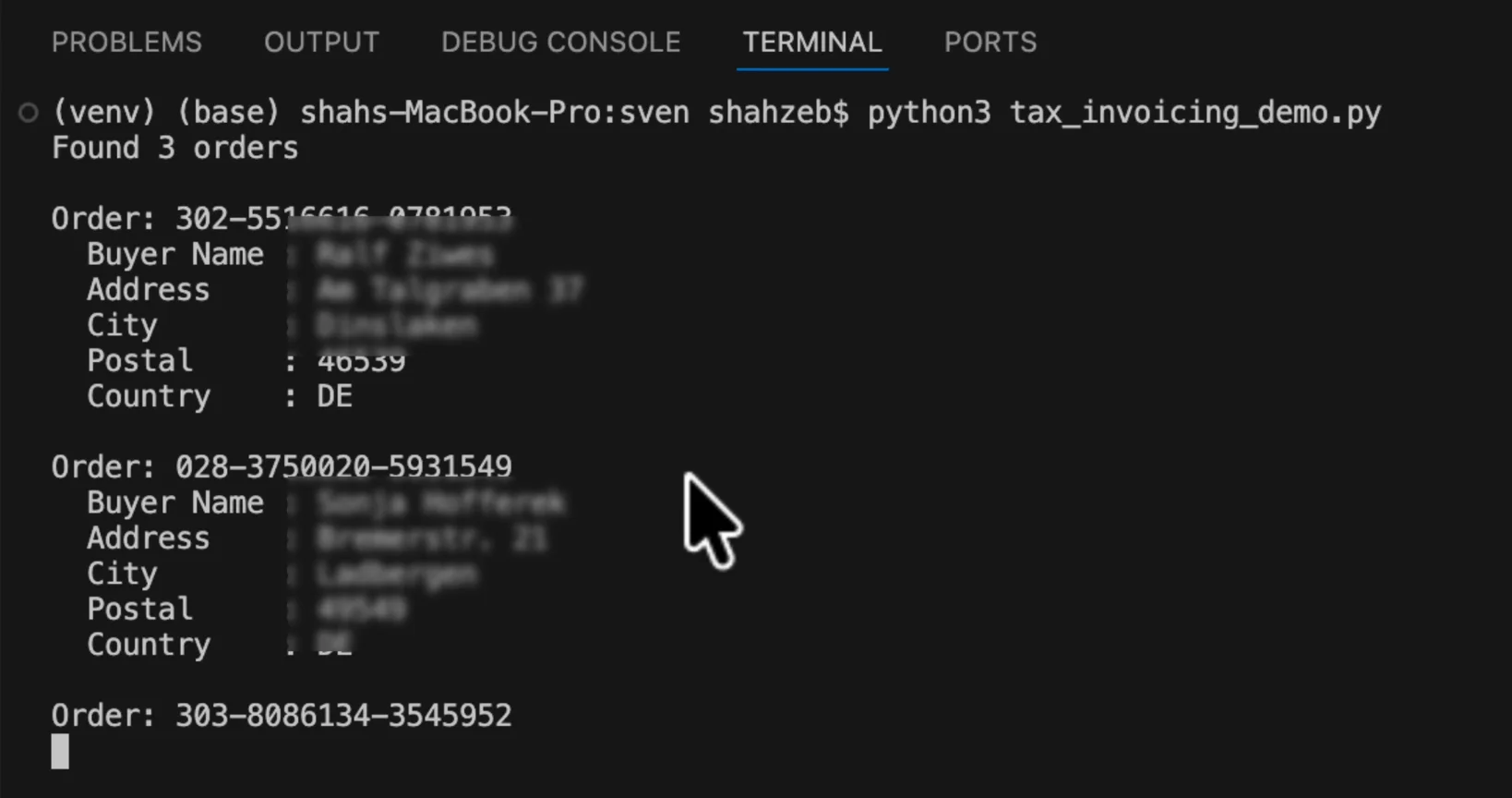
Three orders, three real buyer names, three real DE shipping addresses. Pulled live, on screen, through a Tax Invoicing role and a Restricted Data Token. Exactly the way Amazon designed the system.
Common Errors and Fixes #
- 403 "Application does not have access": You haven't attached the restricted role at the app level, or you're using an old refresh token. Re-list the app, re-authorise, retry.
- RDT mints fine but PII fields are still null: You passed
dataElementson a per-order endpoint. Remove it. - 403 on certain marketplaces only: Restricted role approvals can be region-scoped. Check the role coverage in SPP.
- Token expired errors: RDTs live for 1 hour. Mint a fresh one per order batch, or per-request if your volume is low.
- Rate limiting on the Tokens API: The Tokens API has its own rate limit (1 request/second restore, 10 burst). For high-volume builds, mint one RDT per batch of orders rather than one per order.
Production Patterns #
For a production integration that pulls PII reliably:
- Mint one RDT per order batch (group orders into batches of 50 — the max for
getOrders) - Cache the RDT for up to 55 minutes (5 minutes safety buffer before the 1-hour expiry)
- Use a dedicated service account with only the restricted role and nothing else
- Compliance-ready audit logs of every PII access
- PII purge policy: don't store addresses longer than you need them
The pattern is always the same: regular SP-API for everything that's not PII, RDT for the buyer-private fields, fresh RDT every hour, log every access.
Resources #
- 📦 Full demo repo on GitHub — Python script,
.envtemplate, README, requirements - Amazon Tokens API v2021-03-01 reference
- SP-API roles ↔ operations mapping
- python-amazon-sp-api (saleweaver)
FAQ #
Do I need separate RDTs for each restricted role?
No. One approved role is enough. The RDT itself is scoped to the operations you list in restrictedResources, not to the role you used to qualify for it. Same buyer name and address comes back whether the qualifying role on your account is Tax Invoicing or Direct-to-Consumer Shipping.
Can I reuse the same RDT for multiple orders?
Only if you mint it against multiple restrictedResources in a single call — you can list up to 50 order-specific paths in one RDT request. You cannot reuse an RDT minted for order A on order B; the path is scoped.
What's the difference between an RDT and a regular SP-API access token?
A regular access token (LWA) authorises non-restricted operations only. An RDT is minted using an LWA token and authorises specific restricted operations on specific resources. RDTs are scoped narrower and live shorter. You always need both — LWA to mint the RDT, RDT to call the PII endpoint.
Why is dataElements being ignored?
It's not being ignored — it's silently nullifying your token's scope. Per-order PII endpoints (/address, /buyerInfo, /orderItems/buyerInfo) don't accept dataElements. Pass it and Amazon mints you a token with no scopes that 403s the moment you use it. Bulk endpoints (getOrders, getOrderItems) do accept dataElements — that's where the field belongs.
Related guides
Amazon SP-API
The SP-API Reports Pattern Everyone Gets Wrong (Async, Step by Step)
The SP-API Reports API is asynchronous — request, poll, download, decompress — and most broken integrations either treat it like a synchronous call or poll it straight into a throttle. Here's the correct four-step flow, the status states that trip people up, and the gzip gotcha at the end.
Read guide →Amazon SP-API
Amazon Vendor Central API: What 1P Vendors Can Actually Automate
Vendor Central (1P) has a real API surface through the SP-API vendor family — retail analytics, purchase orders, shipments, invoices, and direct fulfillment. Here's what's genuinely automatable, what still isn't, and where the fastest wins are for a 1P vendor.
Read guide →Amazon SP-API
Amazon SP-API 403 Unauthorized: Every Cause and How to Fix It
A 403 "Access to requested resource is denied" from the SP-API almost never means your credentials are wrong — it usually means a role, a token, a region, or an authorization is mismatched. Here are the eight causes that produce a 403, in the order worth checking them, with the exact fix for each.
Read guide →Don't want to build this yourself?
I set this up for sellers and agencies every week. Book a free 30-minute audit of your Amazon data & PPC setup — you'll leave with a plan either way, whether we work together or not.