
What You Are Actually Trying to Get #
If you sell on Etsy and you want your orders in your own dashboard, warehouse system or accounting tool, you need Etsy API access. Before the steps, it helps to know what you are working towards, because Etsy hands you two separate things and people routinely confuse them.
The short version
You need an app (which gives you a keystring and a shared secret, identifying your software) and then, separately, a token per shop (which the shop owner grants by clicking Allow). The app is one-time. The token is once per shop, and it never expires as long as you keep using it.
That distinction matters because most "why doesn't this work" confusion comes from having one and thinking it's the other. Your API key alone will not get you a single order — it only says who your software is.
Before You Start: What You Need #
Nothing exotic, but gather these first or you will stall halfway:
- An Etsy account. You do not need to be a seller to register an app, but you do need a shop to connect to if you want order data.
- An HTTPS callback URL you control. Etsy will redirect the shop owner back to it after they approve. It must be registered in advance and must match exactly. Localhost works for development.
- Somewhere to store secrets. You will be handling a shared secret and per-shop tokens. Plan for encrypted storage now rather than retrofitting it.
- A rough answer to "how many shops?" This decides which access tier you need, and it is the single most common thing people get caught out by. See step 4.
The Five Steps #
- Register an app
Go to the Etsy developer portal and create an app. You describe what it does and who uses it. Approval for basic access is fast — this is not the Amazon SP-API approval experience.
- Collect your two credentials
Etsy gives you a keystring (your client ID) and a shared secret. Both come from your app's page in the portal.
- Send the shop owner through OAuth
They click Allow on an Etsy consent screen. You receive a code, which you exchange for an access token and a refresh token.
- Check whether you need Commercial access
New apps start limited. If you plan to serve more than a handful of shops, request the upgrade early — it takes days, not minutes.
- Make your first call
Fetch the shop, then the receipts. If step 5 fails, the error tells you exactly which of the first four you got wrong.
The x-api-key Header Format That Trips Everyone #
This one is worth its own section because the error it produces is unhelpful and the fix is non-obvious.
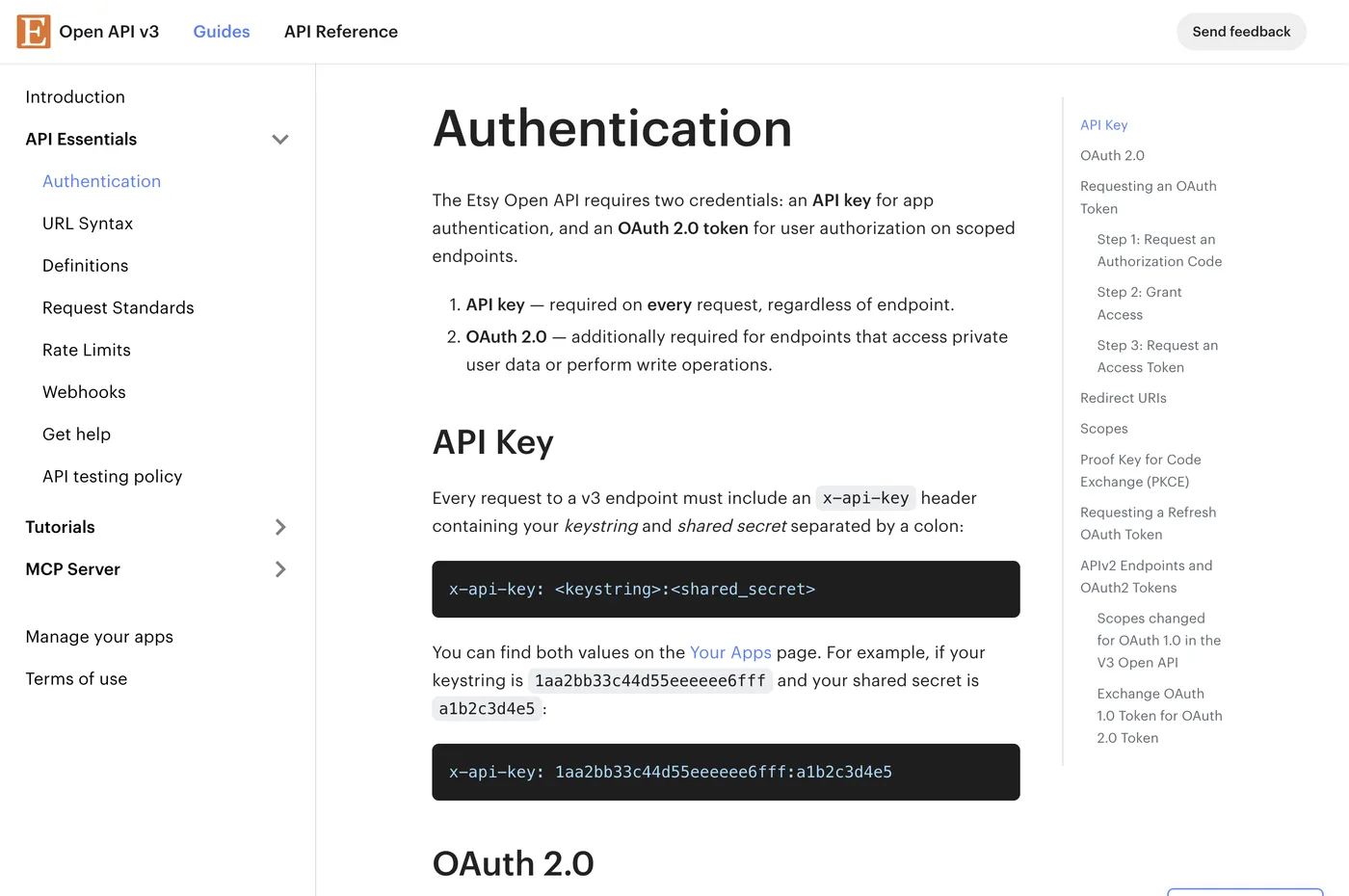
Every request to a v3 endpoint needs an x-api-key header — even the ones that also need OAuth. And for endpoints requiring OAuth, the value is not just your keystring. It is your keystring and shared secret joined with a colon:
x-api-key: <keystring>:<shared_secret>
Authorization: Bearer <access_token>
Send only the keystring where the pair is expected and you get an authentication failure that reads like a token problem, so you go and regenerate tokens — which changes nothing. Check the header format first whenever Etsy rejects you unexpectedly. The rules are in Etsy's authentication guide.
The 5-Shop Limit Nobody Warns You About #
Here is the constraint that changes project plans, and it is easy to miss until you are already building.
A new Etsy app starts on Personal Access, which can connect up to 5 shops. That is plenty if you run a few of your own shops. It is nowhere near enough if you are building a tool for other sellers, or managing shops for clients.
Going beyond that requires Commercial Access, which you request in the portal and which takes a few days to be reviewed. Nothing about the API changes — it is purely a permission ceiling.
Request it early. If your project needs more than 5 shops, submit the Commercial Access request on day one, not the week before launch. It is a review by a human, and you cannot speed it up. Teams routinely discover this limit at shop number six, with a deadline already committed.
OAuth: PKCE Is Required #
Etsy uses OAuth 2.0 authorization code grant with PKCE, which is not optional. If you have integrated Amazon or wired up an eBay seller account over OAuth before, this is the step that is genuinely different.
In plain terms, PKCE means you generate a random secret before sending the user off, send a hash of it to Etsy, and present the original when you exchange the code. It stops someone who intercepts the code from using it.
import base64, hashlib, os

verifier  = base64.urlsafe_b64encode(os.urandom(32)).rstrip(b"=").decode()
challenge = base64.urlsafe_b64encode(
    hashlib.sha256(verifier.encode()).digest()
).rstrip(b"=").decode()

# send the shop owner here
auth_url = (
    "https://www.etsy.com/oauth/connect"
    f"?response_type=code&client_id={KEYSTRING}"
    f"&redirect_uri={REDIRECT_URI}"
    f"&scope=transactions_r%20listings_r"
    f"&state={csrf_state}"
    f"&code_challenge={challenge}&code_challenge_method=S256"
)
# keep `verifier` — you must present it at the token exchange
Store the verifier against the state value so you can retrieve it when Etsy redirects back. Losing it means starting the consent over.
The Token Behaviour That Will Break Your Integration Later #
Everything above is one-time setup. This part decides whether your integration still works in three months.
| Token | Lives for | Behaviour |
|---|---|---|
| Access token | 1 hour | Mint from the refresh token as needed |
| Refresh token | 90 days | Rotates on every refresh — you get a new one and the old one dies |
That rotation is the important bit. Every time you refresh, Etsy issues a new refresh token and invalidates the one you used. So:
- You must save the new refresh token immediately and reliably. If your process crashes between receiving it and writing it to your database, that shop is disconnected permanently and the owner has to click Allow again.
- Two syncs of the same shop at once will break each other, because the second refresh invalidates the token the first is still using.
The good news: as long as a shop syncs at least once every 90 days, the chain renews itself forever and nobody ever logs in again. Get the storage right and this is genuinely set-and-forget. Get it wrong and it fails weeks later, seemingly at random — the full failure mode is in the deep dive on Etsy's rotating refresh token.
Scopes Are Frozen at Consent #
One decision to make carefully before you send anyone through the consent screen: the scopes you request are locked in for that token. Refreshing cannot add a scope.
So if you launch with read-only access and later want to write tracking numbers back, every shop already connected must go through consent again. For a handful of your own shops that is an afternoon. For hundreds of customers it is a support campaign.
Think one release ahead. If write access is on your roadmap at all, it is usually worth requesting it at the start and simply not using it yet.
Your First Call, and What the Errors Mean #
Once you have a token, confirm the whole chain works before building anything on top:
GET https://openapi.etsy.com/v3/application/users/me
x-api-key: <keystring>:<shared_secret>
Authorization: Bearer <access_token>
If that returns your user, the credentials, the token and the header format are all correct. Then fetch receipts for the shop.
| What you see | What it usually means |
|---|---|
| 401 on every call | x-api-key format — check it is keystring:shared_secret, not just the keystring |
| 403 on a specific endpoint | That scope was not requested at consent. Re-consent with the scope added. |
| Works, then fails days later | Refresh-token rotation — you are not persisting the new token, or two syncs raced |
| Cannot connect a sixth shop | Personal Access limit; request Commercial Access |
| redirect_uri mismatch | The registered URL must match exactly, including trailing slash |
Etsy also enforces rate limits, so pace your calls rather than pulling everything in a loop.
Connecting several marketplaces? Etsy's model is not the same shape as the others — here is how Amazon, Etsy, Walmart and eBay differ, or talk to me about the integration.
FAQ #
How do I get Etsy API access?
Register an app in the Etsy developer portal to get a keystring and shared secret, then send each shop owner through an OAuth 2.0 consent flow with PKCE to receive a per-shop access and refresh token. Basic app approval is quick; serving more than 5 shops requires a separate Commercial Access request.
Is the Etsy API free?
Yes, access to the Open API v3 is free. There are rate limits on how many calls you can make, but no fee for access itself.
How many shops can an Etsy app connect to?
A new app on Personal Access can connect up to 5 shops. Beyond that you must request Commercial Access in the developer portal, which is reviewed by Etsy and takes a few days.
Why does my Etsy API call return 401 even with a valid token?
Most often the x-api-key header format. For OAuth-scoped endpoints the value must be your keystring and shared secret joined by a colon, not the keystring alone.
Does Etsy's refresh token expire?
It lasts 90 days and rotates on every refresh — each refresh returns a new refresh token and invalidates the previous one. As long as you persist the new token and sync at least once every 90 days, the chain renews indefinitely.
Does the Etsy API require PKCE?
Yes. Etsy's OAuth 2.0 authorization code grant requires PKCE with the S256 method, unlike Amazon SP-API and eBay, which do not.
Related guides
Marketplace APIs
Connect an eBay Seller Account over OAuth (Keyset, RuName, getOrders)
Wiring one eBay seller into a custom app end to end: the production keyset, why redirect_uri is the RuName string and not your callback URL, the read-only scopes, token exchange with Basic auth, the ~18-month non-rotating refresh token, and the first getOrders pull.
Read guide →Marketplace APIs
Amazon vs Etsy vs Walmart vs eBay: Four Marketplace APIs, Four Auth Models
If you're integrating more than one marketplace, the authentication layer is where your abstraction breaks first. All four use OAuth 2.0 on paper, and no two behave the same way in practice. Here's what actually differs — token lifetimes, rotation, credential ownership — and how those differences should shape your database schema.
Read guide →Marketplace APIs
No Marketplace Gives You a Real Buyer Phone Number (What to Do Instead)
Your carrier API rejects the shipment because the consignee phone is missing, and the order payload simply doesn't contain one. That's not a bug in your integration — Etsy and Walmart don't return a buyer phone at all, and Amazon's is a relay number. Here's what each marketplace actually gives you and how to satisfy the carrier without inventing data.
Read guide →Want one system across every channel?
Amazon, eBay, Etsy, Walmart, Shopify and the carriers: four auth models, one place for orders, labels and P&L. Tell me your channels and I'll reply within 12 hours with a plan and a fixed price.