redirect_uri is a RuName, not your callback URL #
You're wiring one eBay seller into your own app — pull their orders, show them in a dashboard. You build the authorize URL the way every OAuth walkthrough shows it: client_id, response_type=code, and redirect_uri set to https://api.example.com/ebay/oauth/callback. eBay rejects it.
The fix is one line, and it's the single most confusing thing about eBay OAuth: eBay's redirect_uri is not a URL. It's a RuName — an opaque string eBay generates, shaped like YourApp-YourApp-PRD-abc123-def456. Your real callback URL is configured separately, on the RuName, as its "auth accepted URL". You pass the RuName; eBay looks up the accepted URL behind it and redirects the browser there with the code.
Once that clicks, the rest is standard OAuth 2.0 authorization-code — with a handful of eBay-specific edges that each cost an hour. Here's the whole path, connecting one seller end to end.
Start with a production keyset, and choose OAuth over Auth'n'Auth #
Everything hangs off a production keyset in the eBay developer portal: an App ID (your client id), a Cert ID (your client secret), and a Dev ID. One keyset, one app — it serves every seller who consents. You do not need a keyset per seller.
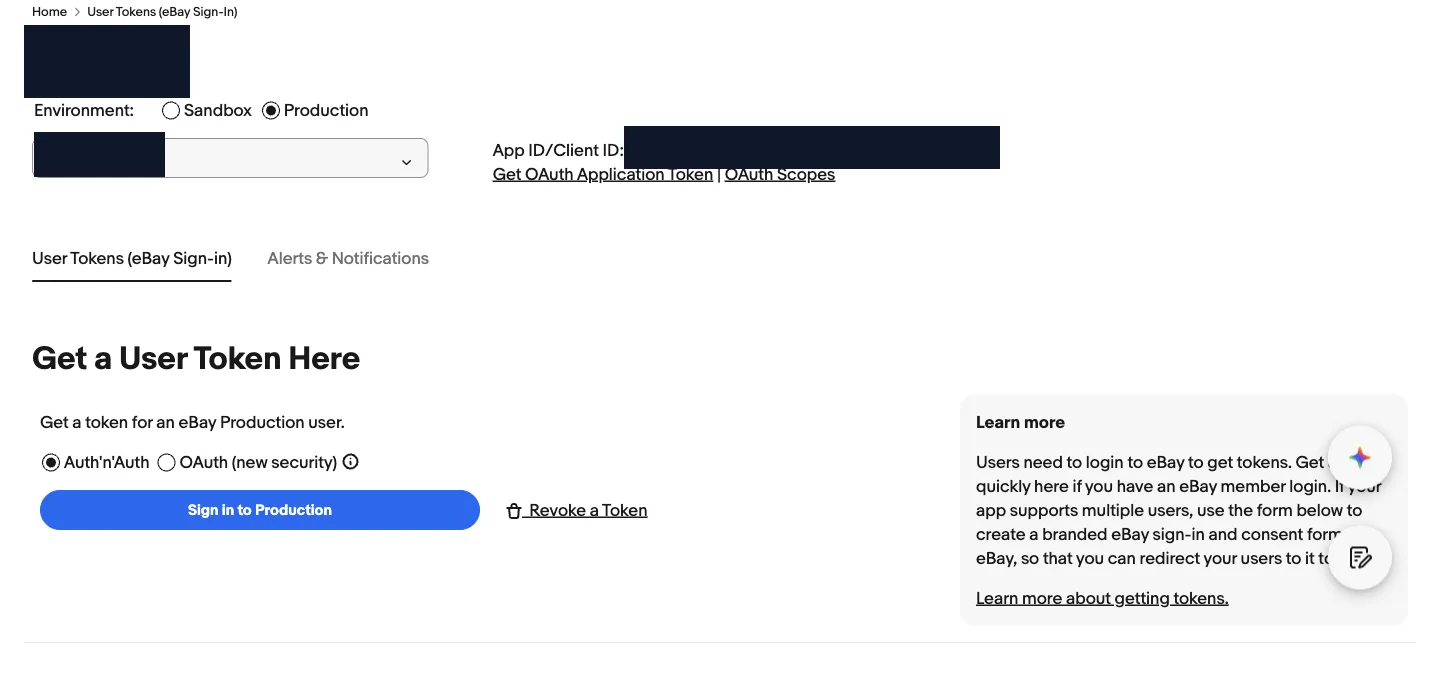
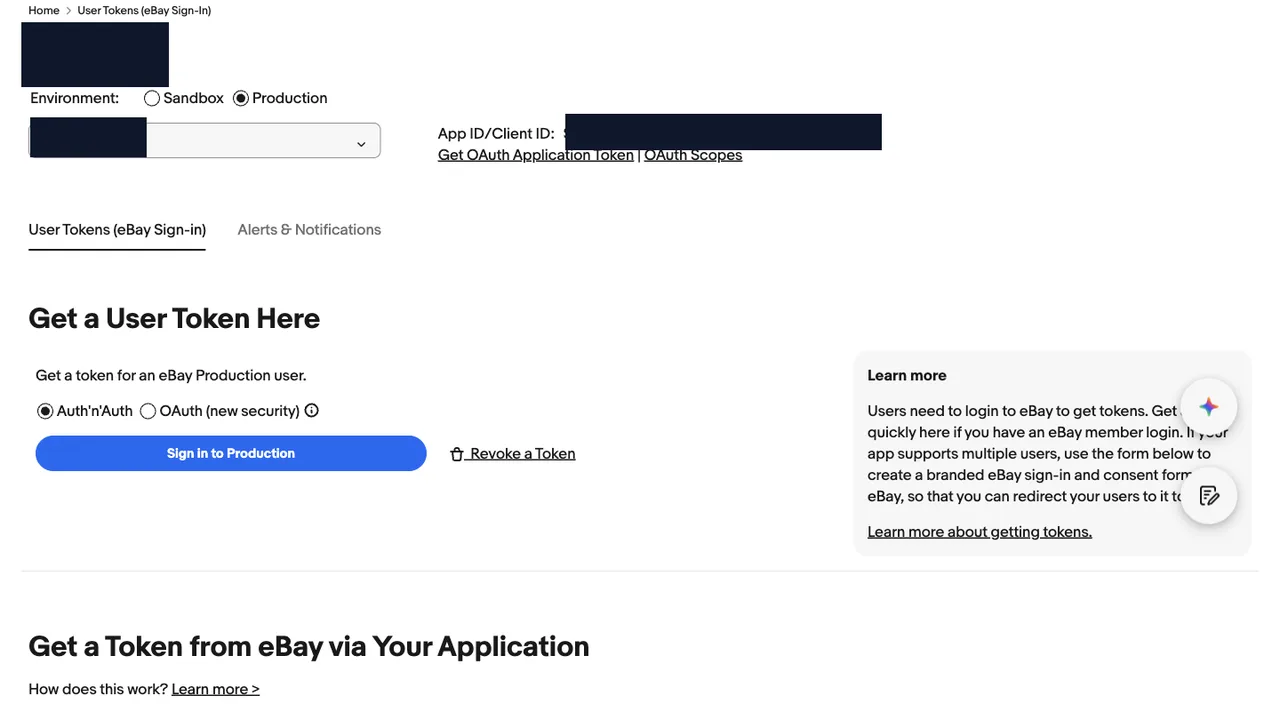
On the same screen eBay offers two auth systems, and the choice is permanent enough to matter. Auth'n'Auth is the legacy token system tied to the old Trading API. OAuth ("new security") is the modern one, and it's what every REST Sell API expects. Pick OAuth. An Auth'n'Auth token will not authorize a sell.fulfillment call, and you don't want to discover that after building half the integration.
Mental model: the keyset identifies your software; a RuName identifies where a consenting seller's browser lands afterward; the seller's refresh token identifies one seller. Three different things, and eBay's portal spreads them across three screens.
The RuName is gated behind 'Confirm your Legal Address' #
To create the RuName you click Add eBay Redirect URL. If your developer account hasn't completed its contact details, eBay stops you with a "Confirm your Legal Address" form first — legal name, business name, and a full postal address. This is the step that actually blocked us: the RuName screen will not produce a RuName until that form is filled and saved.
Past it, the RuName row carries three fields you set: a Display Title (what the seller sees on the consent screen), a privacy policy URL (eBay requires a real, secure one), and the auth accepted URL — your backend callback. Then flip OAuth Enabled on for that RuName.
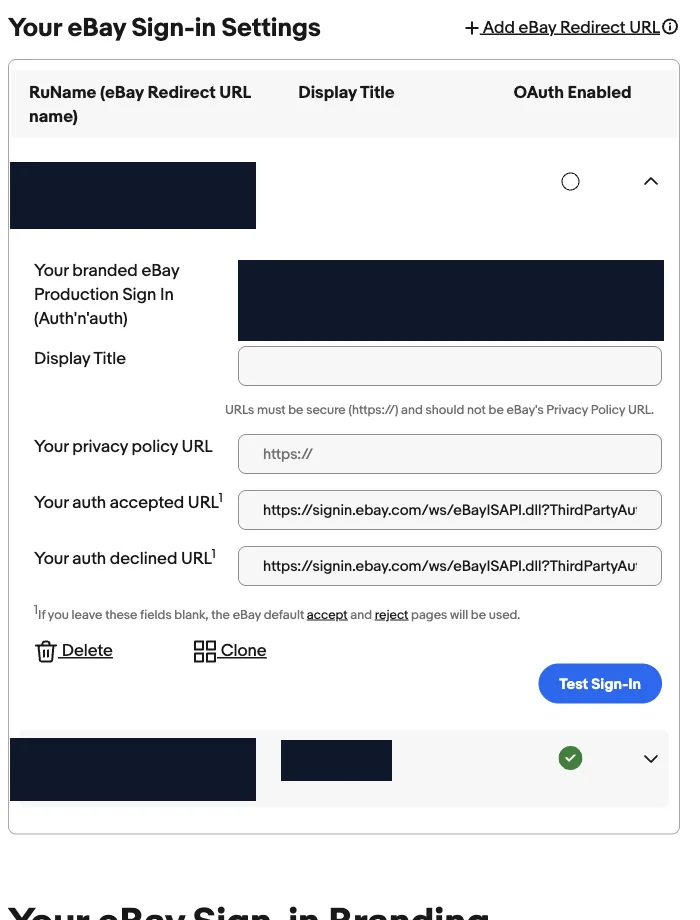
One more trap: editing an existing RuName's accepted URL in the portal did not reliably persist for us, while setting it on a freshly created RuName did. If a redirect keeps landing on eBay's generic "success" page instead of your callback, check that the accepted URL actually saved — a blank accepted URL falls back to eBay's default pages.
Three read-only scopes, and why #
You request scopes in the authorize URL, space-separated. For read-only order sync, three do the job:
https://api.ebay.com/oauth/api_scope/sell.fulfillment.readonly
https://api.ebay.com/oauth/api_scope/sell.account.readonly
https://api.ebay.com/oauth/api_scope/commerce.identity.readonly
- sell.fulfillment.readonly — the orders themselves via
getOrders: buyer ship-to, line items, pricing. - sell.account.readonly — account-level settings you often want alongside orders.
- commerce.identity.readonly — the one people forget. It's what lets you call
getUserand learn which seller just connected (more below).
Ask only for what you use. A read-only integration that requests write scopes is a consent screen the seller is more likely to abandon, and a bigger blast radius if a token leaks.
Token exchange: Basic auth, base64(AppID:CertID), form-encoded #
The seller consents, eBay redirects to your callback with the code, and you exchange it at the token endpoint. Two details trip people:
- The credentials go in an HTTP Basic auth header —
base64("AppID:CertID")— not in the body. - The body is form-encoded (
application/x-www-form-urlencoded), andredirect_uriis the RuName again, matching the authorize call.
import base64, os, httpx

async def exchange_code(code: str) -> dict:
    basic = base64.b64encode(
        f'{os.environ["EBAY_CLIENT_ID"]}:{os.environ["EBAY_CERT_ID"]}'.encode()
    ).decode()
    data = {
        "grant_type": "authorization_code",
        "code": code,
        "redirect_uri": os.environ["EBAY_RUNAME"],   # the RuName, not a URL
    }
    headers = {
        "Content-Type": "application/x-www-form-urlencoded",
        "Authorization": f"Basic {basic}",
    }
    async with httpx.AsyncClient(timeout=30) as client:
        resp = await client.post(
            "https://api.ebay.com/identity/v1/oauth2/token",
            data=data, headers=headers,
        )
        resp.raise_for_status()
        return resp.json()
Sandbox is the same shape with api.sandbox.ebay.com. The response carries access_token, refresh_token, expires_in, and refresh_token_expires_in — which brings us to the part that changes how you store tokens.
2h access, ~18-month non-rotating refresh: do not re-persist it #
eBay's token lifetimes:
- Access token: 2 hours (
expires_in: 7200). - Refresh token: about 18 months (
refresh_token_expires_inis roughly 47,304,000 seconds) — and, the important part, it does not rotate.
Because the refresh token is stable, you persist it once, at connect time, and never again. The refresh grant returns a fresh access token and no new refresh token; there is nothing new to save. Contrast Etsy, whose refresh token rotates on every use — there you must write the new refresh token back on each refresh, or the next one fails. Carry Etsy's habit to eBay and you add a pointless write on the hot path; do the reverse and Etsy breaks a day later.
| Marketplace | Refresh token | Re-persist on refresh? |
|---|---|---|
| eBay | ~18 months, static | No — store once at connect |
| Etsy | 90 days, rotates | Yes — atomically, every time |
| Amazon SP-API | Long-lived, static | No |
| Walmart | None (client credentials) | N/A |
async def store_tokens(account, payload: dict):
    account.access_token = encrypt(payload["access_token"])
    account.token_expires_at = now() + timedelta(seconds=payload["expires_in"])
    # Only the initial code exchange returns a refresh token. The refresh grant
    # does NOT: eBay's refresh token is long-lived and non-rotating.
    if payload.get("refresh_token"):
        account.refresh_token = encrypt(payload["refresh_token"])
        account.refresh_expires_at = now() + timedelta(
            seconds=payload["refresh_token_expires_in"]
        )
    await save(account)
Gotcha: the refresh grant needs the scope parameter sent again, with the same scopes. Omit it and eBay can hand back an access token missing the scope you rely on.
Which seller connected? getUser lives on apiz.ebay.com #
After the exchange you have tokens, but you don't yet know who they belong to — which matters the moment you onboard more than one account and need to label the row correctly. getUser answers it, and it sits on a host that's easy to miss:
GET https://apiz.ebay.com/commerce/identity/v1/user
Authorization: Bearer <access_token>
Note apiz.ebay.com, not api.ebay.com. The Identity API lives on a different host from the Sell APIs, and a request to the wrong one 404s in a way that reads like a broken path. It returns username, userId, registrationMarketplaceId, and account type — enough to confirm the connection and store a stable id.
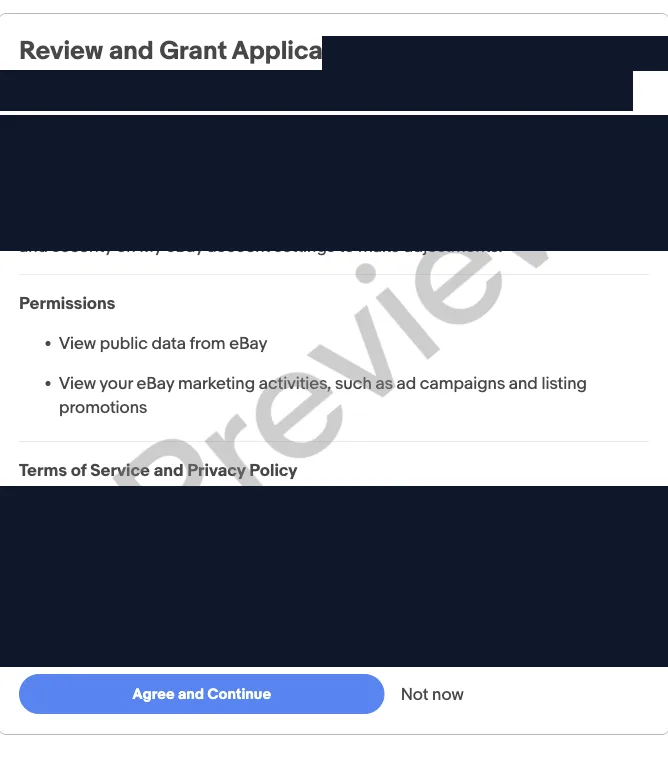
This is also the check that saves you at scale. If you send a seller a per-account consent link but they happen to be signed into a different eBay account, getUser reports the real identity — so you can refuse the mismatch instead of silently wiring one seller's tokens onto another seller's row.
The first getOrders: 90-day default, lastmodifieddate, and marketplaces #
Orders come from the Sell Fulfillment API:
GET https://api.ebay.com/sell/fulfillment/v1/order
Three things about that first call:
- No filter means the last 90 days, only. Call it bare and you get a 90-day window, not "all orders". For a full backfill you page through explicit date ranges.
- Use
lastmodifieddatefor incremental sync, notcreationdate. A last-modified filter also catches status changes — a ship, a cancel, a refund — on older orders, which a creation-date sweep silently misses; neither filter tells you when an order disappears from the API entirely. - One token spans all of a seller's marketplaces. A single eBay account can sell on multiple sites under one token, and
getOrdersreturns them together. ReadlineItems[].listingMarketplaceId(for exampleEBAY_US,EBAY_GB) to know which one each order came from.
from datetime import datetime, timedelta, timezone

def since(hours: int) -> str:
    t = datetime.now(timezone.utc) - timedelta(hours=hours)
    return t.strftime("%Y-%m-%dT%H:%M:%S.000Z")

params = {
    "filter": f"lastmodifieddate:[{since(48)}..]",
    "limit": 200,
    "offset": 0,
}
Gotcha: on getOrders, cancelStatus.cancelRequests always comes back as an empty array — even for an order with a live cancellation. eBay populates it only on the single-order getOrder call. Key your cancellation logic off getOrders and you'll conclude nobody ever cancels.
The re-auth nobody calendars: 18 months #
The 18-month refresh token feels infinite during a build, which is exactly why it's the thing that breaks in production a year and a half later. It does not auto-renew. When it expires, the only fix is the seller going through the consent screen again — there is no silent server-side refresh past that point.
So the operational task, the moment you connect a seller: store refresh_token_expires_in and set a reminder ahead of it. Alert yourself weeks before expiry, per account, and re-drive consent before it lapses rather than after orders quietly stop syncing. For a multi-account setup this is a small watchdog, not a sticky note — every account expires on its own clock.
Doing this across several marketplaces at once? The same shape — identify the account from the token, store the expiry, alert before it lapses — applies to Amazon's LWA refresh tokens and Etsy's rotating ones, just with different lifetimes and rotation rules. Related: how buyer-PII access works on Amazon SP-API, and getting SP-API access in the first place.
FAQ #
Is eBay's redirect_uri a URL or a RuName?
A RuName. You pass the RuName string as redirect_uri in both the authorize and token calls. Your actual callback URL is configured separately as the RuName's "auth accepted URL", and eBay redirects there with the authorization code.
Do I need a separate eBay keyset for each seller?
No. One production keyset (App ID, Cert ID, Dev ID) serves every seller. Each seller connects once through OAuth consent and gets their own refresh token; the keyset is shared across all of them.
How long do eBay OAuth tokens last?
The user access token lasts 2 hours. The refresh token lasts about 18 months and does not rotate, so you store it once and re-mint access tokens from it. When the refresh token expires the seller must re-authorize.
Why does eBay getUser return 404?
Almost always because it's on the wrong host. getUser is at apiz.ebay.com/commerce/identity/v1/user, not api.ebay.com. The Identity API runs on apiz; the Sell APIs run on api.
Why is cancelStatus.cancelRequests always empty on getOrders?
By design. getOrders returns that array empty regardless of actual cancellations; only the single-order getOrder call populates it. Use getOrder when you need cancellation detail.
Related guides
Marketplace APIs
Amazon vs Etsy vs Walmart vs eBay: Four Marketplace APIs, Four Auth Models
If you're integrating more than one marketplace, the authentication layer is where your abstraction breaks first. All four use OAuth 2.0 on paper, and no two behave the same way in practice. Here's what actually differs — token lifetimes, rotation, credential ownership — and how those differences should shape your database schema.
Read guide →Marketplace APIs
No Marketplace Gives You a Real Buyer Phone Number (What to Do Instead)
Your carrier API rejects the shipment because the consignee phone is missing, and the order payload simply doesn't contain one. That's not a bug in your integration — Etsy and Walmart don't return a buyer phone at all, and Amazon's is a relay number. Here's what each marketplace actually gives you and how to satisfy the carrier without inventing data.
Read guide →Marketplace APIs
Etsy's Rotating OAuth Refresh Token (and the Sync Race It Creates)
Your Etsy integration works for weeks, then a shop quietly stops syncing and only a human re-login fixes it. That is the rotating refresh token: Etsy issues a new one on every refresh and kills the old, so a crashed write or two concurrent syncs orphan the shop. Here is the mechanism, the scheduled-vs-manual sync race, and the cache-plus-lock fix.
Read guide →Want one system across every channel?
Amazon, eBay, Etsy, Walmart, Shopify and the carriers: four auth models, one place for orders, labels and P&L. Tell me your channels and I'll reply within 12 hours with a plan and a fixed price.