The Two Errors You Get, In Order #
You build a Shopify app, install it on your own store to test, and everything works. You send the install link to a client. They open it and get this:
There's a problem loading this page
500

There's a technical problem with Shopify that has prevented this page
from loading. Try reloading this page or going to another page in Shopify.
No error code, no explanation, and Shopify's status page says everything is operational. Fix that one and you get a second, more specific error on the same screen:
The installation link for this app is invalid
The link for installing <your app> cannot be used.
Contact the app developer for more information.
Both are the same underlying problem wearing different masks, and neither is caused by your code. As of August 2026 this is what a Shopify app hits when it was created in the wrong kind of organization.
In one line
An app created in a merchant Dev Dashboard organization can only be installed on stores in that same organization. To install on a client's store, the app must live in a Partner organization with a distribution method selected.
Starting from scratch rather than debugging? How to get Shopify API access walks the whole path in order — Partner org, app, scopes, custom distribution, install link, first GraphQL call.

The Cause: Merchant Orgs vs Partner Orgs #
Shopify has two kinds of organization, and the Dev Dashboard looks nearly identical in both. A merchant organization is created automatically around a store you own. A Partner organization is one you create deliberately at partners.shopify.com.
An app created in a merchant org is implicitly scoped to that org's own stores. Install it anywhere else and Shopify's internal answer is "This app can only be installed on stores that are part of the same organization" — which the merchant sees as a bare 500.
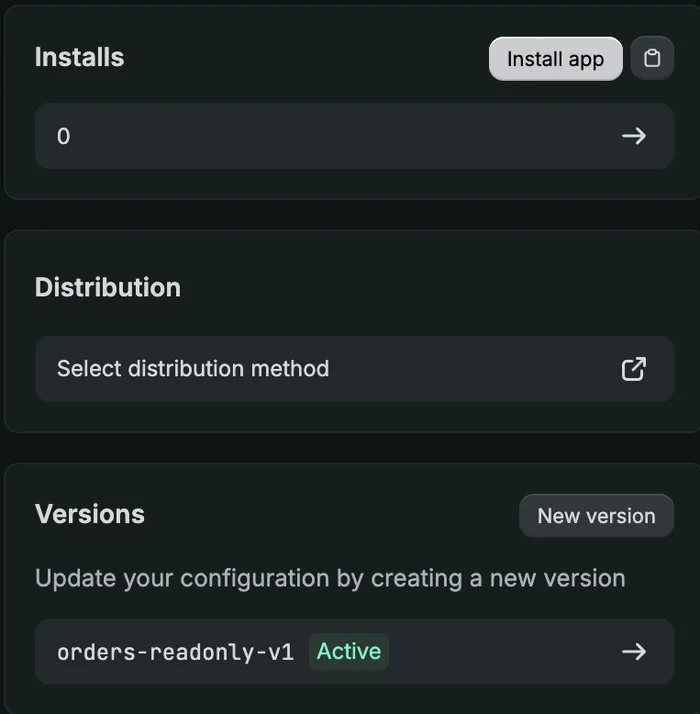
The tell is a section that is missing rather than one that errors. In a merchant org there is no Distribution setting anywhere in the app. In a Partner org, the same app — same scopes, same config — shows Distribution → Select distribution method on the overview.
Here is the same app in a Partner org. The Distribution card simply does not exist in the merchant-org version of this screen:
Collaborator access to the client's store does not help, which is the most common wrong turn. The organization boundary is a property of the app, not of your permissions on their store.
One navigation quirk while you are looking for it: a Partner account has two different organization IDs — one for the Partner dashboard and a different one for its Dev Dashboard. Navigating straight to the Dev Dashboard ID returns 403 Forbidden until you have entered once through the Partner dashboard's own "Visit Dev Dashboard" link.
Three Dead Ends Worth Skipping #
Most Shopify integration advice online predates 2026 and sends you down one of these. All three are confirmed dead as of August 2026.
| Approach | Status | Why it fails |
|---|---|---|
Admin-created custom appSettings → Apps → Create an app |
Removed for new apps, 1 Jan 2026 | The static shpat_… token you copy out of the admin. Existing apps still work, which is why the advice persists. You cannot create new ones. |
| Client credentials grant | Wrong tool | Requires the app and the store to be in the same Dev Dashboard org. A store created through normal Shopify admin never is. It is for dev stores. |
| Collaborator access to the client's store | Irrelevant | Your permissions on their store have nothing to do with which org owns the app. |
One more thing to get right before any of this matters: the REST Admin API has been legacy since 1 October 2024, and apps created after 1 April 2025 must use GraphQL. Do not write a REST client in 2026. See Shopify's REST Admin API reference, which now carries the legacy notice, and the API versioning guide — versions are quarterly and supported for roughly twelve months, so pin the version in config rather than hardcoding it.
Related: if you are wiring several marketplaces at once, how marketplace API auth actually differs compares the token lifetimes and consent flows side by side. Shopify's offline token is the outlier: it never expires at all.
Custom Distribution Means One App Per Store #
Once the app is in a Partner org, you choose a distribution method. There are two, and the choice is permanent.
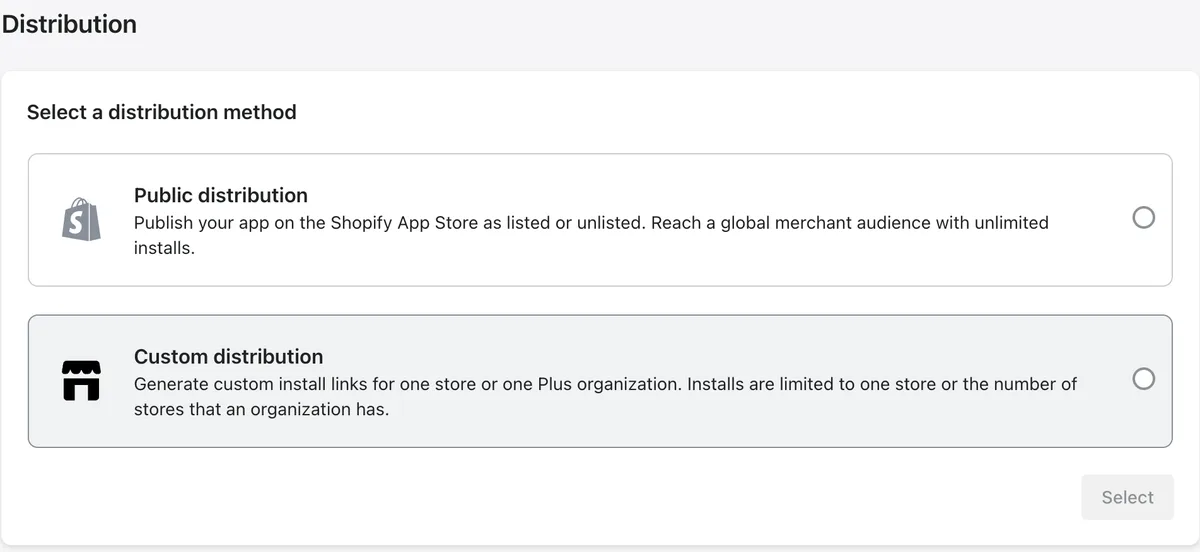
Read Shopify's own wording on the custom option carefully, because it is the sentence that reshapes your architecture:
Generate custom install links for one store or one Plus organization. Installs are limited to one store or the number of stores that an organization has.
One store. The multi-store escape hatch is a Shopify Plus organization — and if your client is on Basic, Grow or Advanced, there is no Plus org to group their stores into. A client with several storefronts therefore needs one app per store, each with its own client ID and secret.
Both decisions are one-way doors. The distribution method cannot be changed after selection, and binding the app to a store is confirmed with an explicit "This can't be undone". That is two irreversible confirmations per store, which is a good argument for scripting the provisioning and for connecting one store end to end before repeating it.
Gotcha: the multi-store checkbox on the custom distribution form is ticked by default and reads "Allow multi-store install for one Plus organization". On a non-Plus client it does nothing useful. Untick it and bind the single store deliberately.
The distribution method documentation states the Plus limitation, but does not say what happens if you skip the step entirely — which is the 500 you started with.
The Install Handoff: Why /admin/oauth/authorize Isn't Enough #
This is the second error, and it is the one that is genuinely under-documented.
For a custom-distribution app, you cannot start the first install by sending the merchant to /admin/oauth/authorize. That returns "The installation link for this app is invalid" with the Install button greyed out. That endpoint only works once the app is already installed — for re-authorisation after a scope change.
The first install must go through Shopify's own signed link, generated in the Partner dashboard:
https://admin.shopify.com/store/<store>/oauth/install_custom_app
    ?client_id=…&signature=…
The signature is a base64 blob Shopify signs. Decode it and you get the binding in plain sight, which is the quickest way to confirm a link goes where you think before you send it to a client:
import base64, json, urllib.parse

sig = urllib.parse.unquote(link.split("signature=")[1].split("--")[0])
payload = json.loads(base64.b64decode(sig + "=" * (-len(sig) % 4)))
# {'expires_at': <unix timestamp, ~7 days out>,
#  'permanent_domain': 'example-store.myshopify.com',
#  'client_id': '...', 'purpose': 'custom_app'}
Note expires_at: install links are good for roughly seven days. If you are provisioning several stores in a batch and the merchant takes a fortnight to get round to it, regenerate rather than debugging a link that quietly aged out.
Then comes the part that catches people: after the merchant clicks Install, Shopify redirects them to your app's App URL with shop, hmac and timestamp — and expects your server to start OAuth from there. If your App URL points at a marketing page or your frontend, the install dead-ends silently.
So the App URL has to be a real endpoint. Mine verifies the HMAC, resolves the store, mints a single-use state, and redirects into the normal grant flow. The authorization code grant reference documents the grant itself but frames it as app-initiated, which is not how a custom-distribution install begins.
One genuinely pleasant surprise at the end of it: the token response contains access_token and scope and no expires_in. A Shopify offline token does not expire. There is no refresh grant to implement and no expiry column to store.
What One App Per Store Does to Your Code #
If you have been treating the app credentials as deployment-level config — one client ID and secret in environment variables — one app per store breaks that assumption. The credentials become per-store data.
def resolve_app_credentials(account=None):
    # Per-store credentials win; the global setting is the fallback, so a
    # single-app deployment keeps working unchanged.
    if account is not None and account.client_id and account.client_secret_encrypted:
        return account.client_id, decrypt(account.client_secret_encrypted)
    return settings.SHOPIFY_CLIENT_ID, settings.SHOPIFY_CLIENT_SECRET
The consequence that is easy to miss: the OAuth callback must verify the HMAC using the secret of the app that store was installed through. Your callback is one public endpoint receiving installs from many different apps. Verify every callback against a single global secret and every per-store install is rejected as forged.
# Resolve the store from the shop param BEFORE verifying, so the signature is
# checked against the right app's secret.
known = await get_by_shop_domain(db, params["shop"])
_, client_secret = resolve_app_credentials(known)
if not verify_hmac(params, client_secret):
    return refusal_page()
Two more things worth building in from the start, because the callback is a public, unauthenticated endpoint and every parameter is attacker-supplied:
- Anchor the shop-domain pattern
A forged
shopparameter would send your token exchange — carrying the client secret — to someone else's host. Match^[a-z0-9][a-z0-9-]*\.myshopify\.com$and reject anything else.shop.myshopify.com.evil.commust not pass. - Bind the state to the store
A single-use
statetied to the shop it was minted for means an install link for store A cannot silently connect store B, even when both belong to the same client.
Related: Shopify order numbers restart at #1001 in every store, so multi-store setups collide immediately if you key on them. Same class of bug as Amazon order IDs not being unique per seller — key on the numeric ID parsed from the GID, scoped by store.
Script the Provisioning, Not the Clicking #
With one app per store, the Partner dashboard work is the same ten steps repeated: create app, configure the version, release it, read the credentials, choose custom distribution, bind the store, generate the link. Two of those steps are irreversible confirmations. Doing that by hand across several storefronts is where mistakes get made — and an app bound to the wrong store cannot be rebound.
It is all ordinary browser automation. The shape that worked, with the assertions being the important part:
def provision(app_name, shop):
    create_app(app_name)
    app_id = app_id_from_url(page.url)

    # Config that must hold, or the install flow silently changes shape:
    #   embedded OFF + legacy install flow ON -> classic authorization code grant
    set_app_url(INSTALL_ENTRY_POINT)
    uncheck("embedded")
    check("use_legacy_install_flow")
    set_scopes(SCOPES)
    set_redirect_urls(CALLBACK)
    assert not is_checked("embedded") and is_checked("use_legacy_install_flow")
    release_version("orders-readonly-v1")

    client_id, client_secret = read_credentials(app_id)

    choose_custom_distribution(app_id)          # irreversible
    bind_store(shop, allow_multi_store=False)   # irreversible
    assert shop_field_value() == shop, "wrong shop bound"

    link = generated_install_link()
    assert f"/store/{shop.split('.')[0]}/" in link, "link points at the wrong store"
    return client_id, client_secret, link
The two assert lines exist because both surrounding actions cannot be undone. Read the store back out of the form before confirming, and read it back out of the generated link afterwards. A misbound app is a wasted app.
Sequence that saves time: provision one store, take it all the way through a real install and a real order sync, and only then batch the rest. The first store is where you discover that the App URL needs to be an endpoint, that a column is too narrow, and that the install link type matters. Discovering that once beats discovering it nine times.
Three Bugs Only Real Orders Caught #
The integration passed a full local test suite and still could not store a single order. Three failures showed up within minutes of connecting a real store, and all three are the kind that only real data produces.
A column too narrow, on Postgres only
The sync wrote the shop domain into a column declared String(8) — sized years earlier for short marketplace codes like US. A myshopify domain is twenty-something characters, and Postgres rejected the entire INSERT:
asyncpg.exceptions.StringDataRightTruncationError:
value too long for type character varying(8)
Every order failed. The full local test suite was green throughout, because SQLite does not enforce VARCHAR length — it would have stored the whole string and carried on. This is the opposite of the usual assumption that SQLite is the permissive one that lets bugs through; here it was permissive enough to hide a bug that only production could show you.
The fix was not to widen the column. The owning store was already identified by its foreign key, so the field stays empty and the shop domain lives where it belongs. Worth a regression test that asserts the contract rather than the value:
def test_marketplace_is_never_set_to_the_shop_domain():
    width = Order.__table__.c.marketplace.type.length
    assert width == 8, "if this changed, revisit why we leave it empty"
    src = inspect.getsource(sync_service._upsert_one)
    assert "marketplace=None" in src
If you develop on SQLite and deploy on Postgres, this class of divergence deserves its own checklist — I wrote up another instance of it here, where the query worked locally and Postgres refused it.
An ordering bug in the post-install lookup
The store's dedicated egress IP was assigned after the first API call rather than before, so the call that resolves the shop's name, plan and currency failed closed and left those fields null. Nothing errored loudly; the row was just quietly incomplete.
A CDN URL inside the engraving text
This is the one that mattered. Shopify line item properties — customAttributes in GraphQL, properties in REST — are where personalisation apps put buyer input. A real order carried two of them: the personalisation text, and a file property holding a CDN URL for a photo the buyer uploaded. Both were being concatenated into the text handed to production, so the string a machine would have physically engraved onto a product contained file: https://cdn.shopify.com/….
The fix is to detect uploads by their value being a URL, not by the key name — personalisation apps do not agree on a key name — and store them as a separate asset. Two related rules earned from the same field: exclude _-prefixed keys, which are the convention for app-internal bookkeeping rather than buyer input, and drop empty values, because an optional field that rendered blank is not personalisation.
| Line item property | Treat as |
|---|---|
Personalization: In loving memory | Engraving text |
file: https://cdn.shopify.com/… | Separate buyer-upload asset |
_bundle_id: abc123 | Ignore — app-internal |
Engraving: (blank) | Ignore — not personalisation |
Compared with other marketplaces this is generous: the personalisation arrives inline and in plain text, with no second call and no archive to download. See the LineItem reference for the field, and how Etsy exposes the same thing for the contrast.
Wiring several storefronts into one operations system and hitting the org boundary? Tell me what you are building — this particular trap costs a day the first time and ten minutes every time after.
FAQ #
Why does my Shopify app install return a 500 on a client's store?
Almost always because the app was created in a merchant Dev Dashboard organization, which can only install on stores inside that same organization. Shopify's underlying message is "This app can only be installed on stores that are part of the same organization", surfaced to the merchant as a generic 500. Recreate the app in a Partner organization and select a distribution method.
What does "The installation link for this app is invalid" mean?
You sent a merchant to /admin/oauth/authorize for an app that is not yet installed on their store. For a custom-distribution app the first install must use the signed oauth/install_custom_app link generated in the Partner dashboard. The authorize endpoint works afterwards, for re-authorisation.
Can one Shopify custom app be installed on multiple stores?
Only if the stores belong to a single Shopify Plus organization. On Basic, Grow or Advanced plans, custom distribution binds one app to exactly one store, and the binding cannot be undone. A client with several storefronts needs one app and one credential pair per store.
Do Shopify access tokens expire?
Offline access tokens do not expire. The token exchange returns access_token and scope with no expires_in field, so there is no refresh grant to implement. Tokens are invalidated when the merchant uninstalls the app or when you change its scopes.
Why can I only see the last 60 days of Shopify orders?
The read_orders scope is limited to the last 60 days. Older history requires read_all_orders, which Shopify grants on request with written justification. Request it early — it is the only part of a Shopify integration with a waiting period, and without it there is no historical backfill for reporting or forecasting.
Related guides
Shopify API
How to Get Shopify API Access: A Step-by-Step Guide (2026)
Connecting to the Shopify Admin API changed twice in 2026, and most guides still describe the removed route. Here is the whole process as it works now — Partner organization, app, scopes, custom distribution, install link, first GraphQL call — plus the two limits that decide what you can actually pull.
Read guide →Amazon Ads API
Amazon Ads API Rate Limits Explained (And How to Stop Hitting Them)
A 429 storm from the Amazon Ads API almost always means your retry logic is wrong, not that your limits are too low. Here's how the per-endpoint token buckets actually work, what the response headers tell you, and the request patterns that keep you comfortably under the limit.
Read guide →Amazon SP-API
The SP-API Reports Pattern Everyone Gets Wrong (Async, Step by Step)
The SP-API Reports API is asynchronous — request, poll, download, decompress — and most broken integrations either treat it like a synchronous call or poll it straight into a throttle. Here's the correct four-step flow, the status states that trip people up, and the gzip gotcha at the end.
Read guide →Don't want to build this yourself?
I set this up for sellers and agencies every week. Book a free 30-minute audit of your Amazon data & PPC setup — you'll leave with a plan either way, whether we work together or not.