What You Are Actually Trying to Get #
One thing: an offline access token for one store. It looks like shpat_…, it goes in an X-Shopify-Access-Token header, and it does not expire.
Everything below exists to produce that token legitimately for a store you do not own. If you only ever call your own store, it is much shorter — but almost nobody's situation stays that way.
In one line
Create an app in a Partner organization, select custom distribution, send the merchant the generated install link, and exchange the code Shopify hands back for a non-expiring token.
Two things to unlearn first, because they are what most search results still tell you to do, and both were removed in 2026:
- The admin custom app is gone. "Settings → Apps → Create an app", then copy a static token out of the admin — that route was removed for new apps on 1 January 2026. Apps created before then still work, which is why the advice persists.
- REST is legacy. The REST Admin API has been legacy since 1 October 2024, and apps created after 1 April 2025 must use GraphQL. Do not start a REST client in 2026.
Before You Start: What You Need #
Gather these first. Two of them are the usual reasons a setup stalls halfway.
| What | Why |
|---|---|
| A Shopify Partner account | Free. An app in a merchant organization cannot install on anyone else's store — see the trap section below. |
The store's .myshopify.com handle | Not the customer-facing domain. Shopify issues random handles now, so you cannot derive it from the brand name — ask for the exact one. |
| A public HTTPS callback URL | It must be reachable by Shopify and registered verbatim. Localhost works for testing, but the redirect allowlist must contain the exact string. |
| The merchant available for one click | That is genuinely their whole involvement. No password, no code to send back. |
Gotcha: the store handle is not derived from the store name. A real store we connected had the brand name in its admin and a handle that read like bfe437-e4.myshopify.com. Guessing wastes an app, because binding is permanent.
The Six Steps #
- Create a Partner organization
At partners.shopify.com. Free, and it takes a couple of minutes. You will be asked for a business address and to accept the Partner Program agreement.
- Create an app in that organization's Dev Dashboard
Use the "Start from Dev Dashboard" option rather than the CLI — the CLI scaffolds an embedded app project, which is not what a server-side data integration needs.
- Configure the version, then release it
This is where the flow is decided. Details in the next section — get these wrong and the install silently behaves differently.
- Select a distribution method
Custom distribution for client work. This choice is permanent per app.
- Generate the install link and send it
Shopify produces a signed
install_custom_appURL bound to one store, valid for about seven days. The merchant opens it and clicks Install. - Exchange the code for a token
Shopify redirects to your App URL; you start OAuth, receive a
codeat your callback, and exchange it. Store the token encrypted.
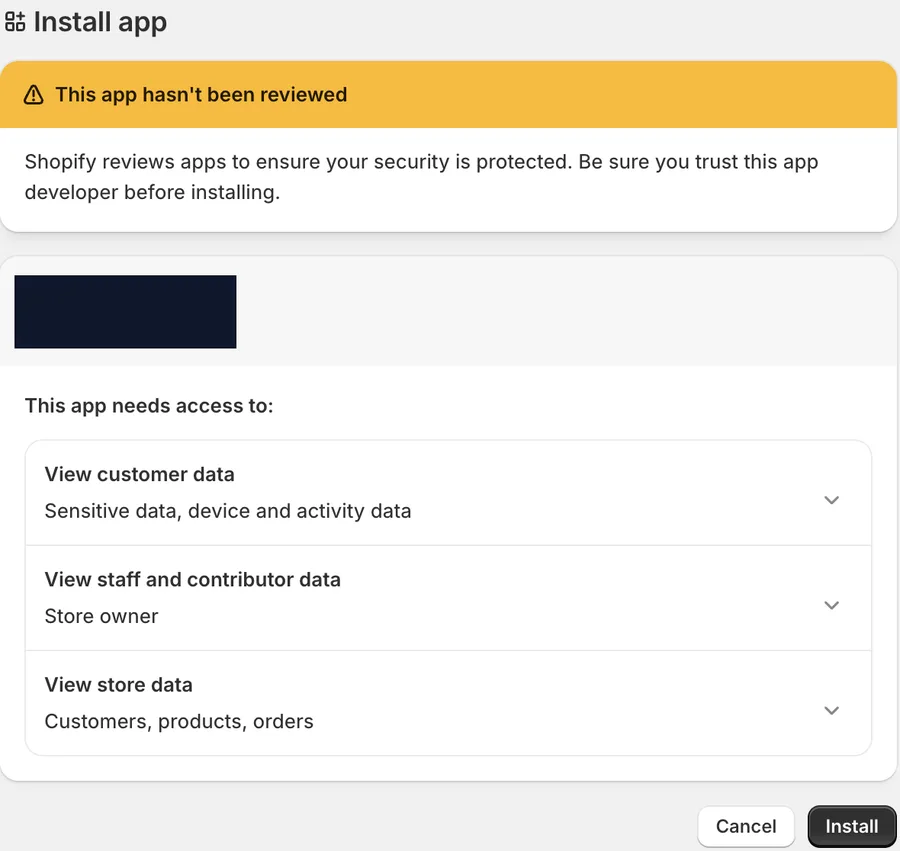
That is what the merchant sees at step 5. The "This app hasn't been reviewed" banner is expected for a custom-distribution app and is not an error — custom apps do not go through App Store review. Warn the merchant it will appear, or you will get a nervous message back.
The App Config That Decides Everything #
Four settings on the app version. Two of them change the entire install flow, and neither is obvious from the form.
| Setting | Value | Why |
|---|---|---|
| Embedded | Off | You are not rendering UI inside Shopify admin. Leaving it on pushes you toward session-token auth designed for embedded apps. |
| use_legacy_install_flow | On | Gives you the classic authorization code grant with your own redirect. Off means Shopify-managed installation and token exchange. |
| App URL | A real endpoint | Not a marketing page. Shopify sends the merchant here mid-install and expects your server to start OAuth. |
| Redirect URLs | Your callback, verbatim | An exact string match. A trailing slash difference is a failed install. |
Scopes for read-only order sync — request the minimum, because every extra one shows on the merchant's consent screen:
read_orders,read_products,read_inventory,read_fulfillments,read_customers,read_shipping
Leave read_all_orders out for now. It needs Shopify's approval, and requesting an ungranted scope fails the whole install. Add it once approved.
Mental model: "embedded off + legacy install flow on" is the combination that means "I am a server that wants a token, not an app that renders inside Shopify." Almost every confusing install symptom traces back to those two.
The Trap: Merchant Orgs Can't Install on Client Stores #
The single most expensive mistake, and worth knowing before you start rather than after.
Shopify has two kinds of organization. A merchant organization is created automatically around a store you own. A Partner organization is one you create deliberately. The Dev Dashboard looks nearly identical in both.
An app created in a merchant org can only install on stores in that same org. Build there, test on your own store, everything works — then send a client the link and they get a bare HTTP 500 with no explanation.
The tell is a section that is missing rather than one that errors: in a merchant org there is no Distribution setting anywhere. In a Partner org it appears on the app overview.
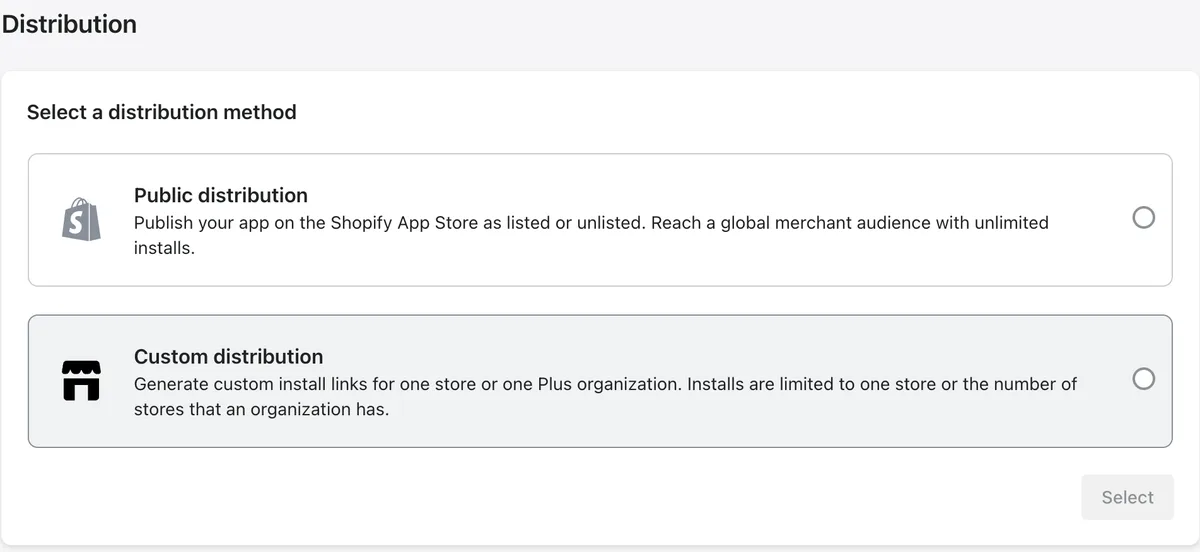
Note the wording on the custom option. Installs are limited to one store, unless every store belongs to a single Shopify Plus organization. So a client on Basic with six storefronts needs six apps and six credential pairs — which is an architectural decision, not a chore, because it means the client ID and secret become per-store data rather than deployment config.
The full diagnosis, including the second error you hit after fixing this one, is in why your Shopify custom app won't install on a client's store.
Getting the Token #
Once the merchant clicks Install, Shopify redirects them to your App URL with shop, hmac and timestamp, and waits for you to start OAuth. Verify the signature, mint a single-use state, and redirect to the grant screen:
https://{shop}/admin/oauth/authorize
    ?client_id={client_id}
    &scope={comma_separated_scopes}
    &redirect_uri={your_callback}
    &state={single_use_nonce}
Shopify then calls your callback with a code. Exchange it:
resp = httpx.post(
    f"https://{shop}/admin/oauth/access_token",
    data={
        "client_id": os.environ["SHOPIFY_CLIENT_ID"],
        "client_secret": os.environ["SHOPIFY_CLIENT_SECRET"],
        "code": code,
    },
)
# {"access_token": "shpat_...", "scope": "read_orders,..."}
# note: no expires_in — offline tokens do not expire
Verify the HMAC on both hops. The callback is a public endpoint, so every parameter is attacker-supplied — and validate the shop domain against an anchored pattern, or a forged shop sends your token exchange, carrying the client secret, to someone else's host.
The token has no expiry. It stops working only when the merchant uninstalls the app or you change its scopes, which forces a re-install.
Your First Call #
Everything is one endpoint. Confirm the token works by asking who you are talking to:
POST https://{shop}/admin/api/2026-07/graphql.json
X-Shopify-Access-Token: shpat_...

{ shop { name myshopifyDomain currencyCode ianaTimezone
         plan { displayName shopifyPlus } } }
The plan field is worth pulling on day one: it tells you whether the merchant is on Plus, which is what decides one-app-per-store versus one app for all of them.
Then orders, filtered so an incremental sync also catches status changes rather than only new orders:
{ orders(first: 50, query: "updated_at:>=2026-08-01T00:00:00Z",
         sortKey: UPDATED_AT) {
    pageInfo { hasNextPage endCursor }
    nodes {
      id name createdAt displayFulfillmentStatus
      totalPriceSet { presentmentMoney { amount currencyCode } }
      shippingAddress { name address1 city zip countryCodeV2 phone }
      lineItems(first: 50) { nodes { sku title quantity
        customAttributes { key value } } }
    }
} }
Gotcha: a GraphQL 200 can still be a failure. Auth, scope and validation errors come back as HTTP 200 with an errors array, and so does throttling (THROTTLED). Check errors on every response or you will treat a permission failure as an empty result set.
Rate limits are cost-based, not request-based: a 2000-point bucket refilling at 100/second on Standard, and each response reports its own cost. A 50-order page with nested line items is cheap — we measured 23 points for five orders with line items. Read extensions.cost.throttleStatus and back off from the reported bucket rather than guessing.
The Two Limits That Decide What You Can Pull #
Both are worth knowing before you promise anyone a dashboard.
Orders older than 60 days need approval
The read_orders scope only returns the last 60 days. Anything older requires read_all_orders, which Shopify grants on request with written justification. Until it is approved there is no historical backfill — no historical P&L, no forecast baseline. It is the only part of a Shopify integration with a waiting period, so request it on day one.
Customer PII is tiered
Shopify splits customer data into two levels. Level 1 excludes name, address, phone and email; Level 2 is exactly those fields — everything a shipping label needs. Access depends on app type: partner-created custom apps get both levels, while public apps go through a data-protection review. See Shopify's protected customer data requirements.
On a custom-distribution app we saw full ship-to — name, street, city, postcode, country and phone — return with no extra review step. Verify it yourself against one real order before building a labelling pipeline on the assumption.
One field that is genuinely often empty: the buyer's phone. Shopify only collects it if the merchant enables it at checkout, so it is absent at source rather than withheld, and no scope change produces it. Carriers usually require one, so plan a fallback. The same problem exists on other marketplaces — here is how the others handle it.
How This Changes Your Database #
Three schema decisions worth making before the second store, not after.
Credentials are per store, not per deployment. On a non-Plus client, each store has its own app, so client_id and client_secret belong on the store row. Keep the global setting as a fallback so a single-store deployment still works.
The callback must verify the HMAC with the right secret. One public endpoint receives installs from many apps. Resolve the store from the shop parameter before verifying, then use that store's secret. Verify everything against one global secret and every per-store install is rejected as forged.
Key orders on the numeric ID, scoped by store. Shopify's order.name is the merchant-facing #1001 and it restarts in every store, so a multi-store sync collides on the first order. Parse the numeric ID out of the GID:
# gid://shopify/Order/1111111111111 -> "1111111111111"
def gid_num(gid: str) -> str:
    return gid.rstrip("/").split("/")[-1]
There is no refresh token and no expiry column, which is a pleasant change from every other marketplace. Store the token encrypted and that is the whole credential lifecycle.
Wiring Shopify alongside other channels? How four marketplace APIs differ on authentication covers the token lifetimes side by side, and why order IDs are not unique per seller is the same keying trap on Amazon. Need it built properly? Tell me what you are connecting.
FAQ #
How do I get Shopify API access?
Create a free Shopify Partner account, create an app in that organization's Dev Dashboard, set its scopes and release a version, select custom distribution, and send the merchant the generated install link. When they click Install you exchange the returned code for a non-expiring offline access token. Since 1 January 2026 you can no longer create the old admin custom app with a static token.
Is the Shopify API free?
Yes. There is no charge for a Partner account or for Admin API access, and custom distribution needs no App Store listing or review. Rate limits are cost-based rather than paid tiers, though the allowance rises on Advanced and Plus plans.
Do Shopify access tokens expire?
Offline access tokens do not expire. The exchange returns access_token and scope with no expires_in, so there is no refresh grant to implement. A token stops working only if the merchant uninstalls the app or you change its scopes.
Can one app connect to multiple Shopify stores?
Only if the stores belong to one Shopify Plus organization. With custom distribution on Basic, Grow or Advanced plans, each app binds permanently to a single store, so a multi-store client needs one app and one credential pair per store.
Should I use the REST or GraphQL Shopify API?
GraphQL. The REST Admin API has been legacy since 1 October 2024 and apps created after 1 April 2025 must use GraphQL, which is also the only API receiving new features. The endpoint is /admin/api/{version}/graphql.json, and the version should live in config because Shopify releases quarterly and supports each version for about a year.
Why do I only get 60 days of Shopify orders?
The read_orders scope is limited to the last 60 days. Older history needs the read_all_orders scope, which Shopify grants on request with written justification. Request it early — it is the only part of the process with a waiting period.
Related guides
Shopify API
Why Your Shopify Custom App Won't Install on a Client's Store
Your Shopify app installs fine on your own store, then returns a bare HTTP 500 on a client's. The cause is that apps created in a merchant Dev Dashboard organization can only install inside that organization — and the fix, custom distribution from a Partner org, quietly means one app per store. Here is the full failure sequence, the dead ends, and what it does to your schema.
Read guide →Amazon Ads API
Amazon Ads API Rate Limits Explained (And How to Stop Hitting Them)
A 429 storm from the Amazon Ads API almost always means your retry logic is wrong, not that your limits are too low. Here's how the per-endpoint token buckets actually work, what the response headers tell you, and the request patterns that keep you comfortably under the limit.
Read guide →Amazon SP-API
The SP-API Reports Pattern Everyone Gets Wrong (Async, Step by Step)
The SP-API Reports API is asynchronous — request, poll, download, decompress — and most broken integrations either treat it like a synchronous call or poll it straight into a throttle. Here's the correct four-step flow, the status states that trip people up, and the gzip gotcha at the end.
Read guide →Don't want to build this yourself?
I set this up for sellers and agencies every week. Book a free 30-minute audit of your Amazon data & PPC setup — you'll leave with a plan either way, whether we work together or not.