Find where your campaigns compete with each other
One Python file that reads your Amazon Ads account and reports every place two of your own Sponsored Products campaigns chase the same customer — then prices the difference using your own search-term reports.
Standard library only. It never writes to your account.
There is a copy-paste prompt if you use Claude Code, and a step-by-step runbook if you would rather drive it yourself.
Campaign Manager will not show you this
Amazon reports performance per campaign. It has no view that answers "which of my campaigns are going after the same search term?" — so the overlap is invisible unless you go and join the data yourself.
Most people who look for it look for duplicate keywords: the same text in two campaigns. On a well-built account that finds almost nothing. The duplication is nearly always between match types — an exact keyword in one campaign that a broad keyword in another campaign also matches — or between a manual campaign and the auto campaign quietly running beside it.
What the scanner reports
Four kinds of overlap, in your live campaigns only:
- Tier 1 — the same keyword and match type in two ad groups on the same ASIN.
- Tier 2 — an exact keyword in one campaign that a phrase or broad keyword elsewhere would also match. Checked against your existing negatives, so anything you already blocked is shown but not held against you.
- Tier 3 — an auto campaign on an ASIN your manual campaigns target, listing which of your manual exact terms it can still reach.
- Tier 4 — the same keyword on two different ASINs of yours, usually variants.
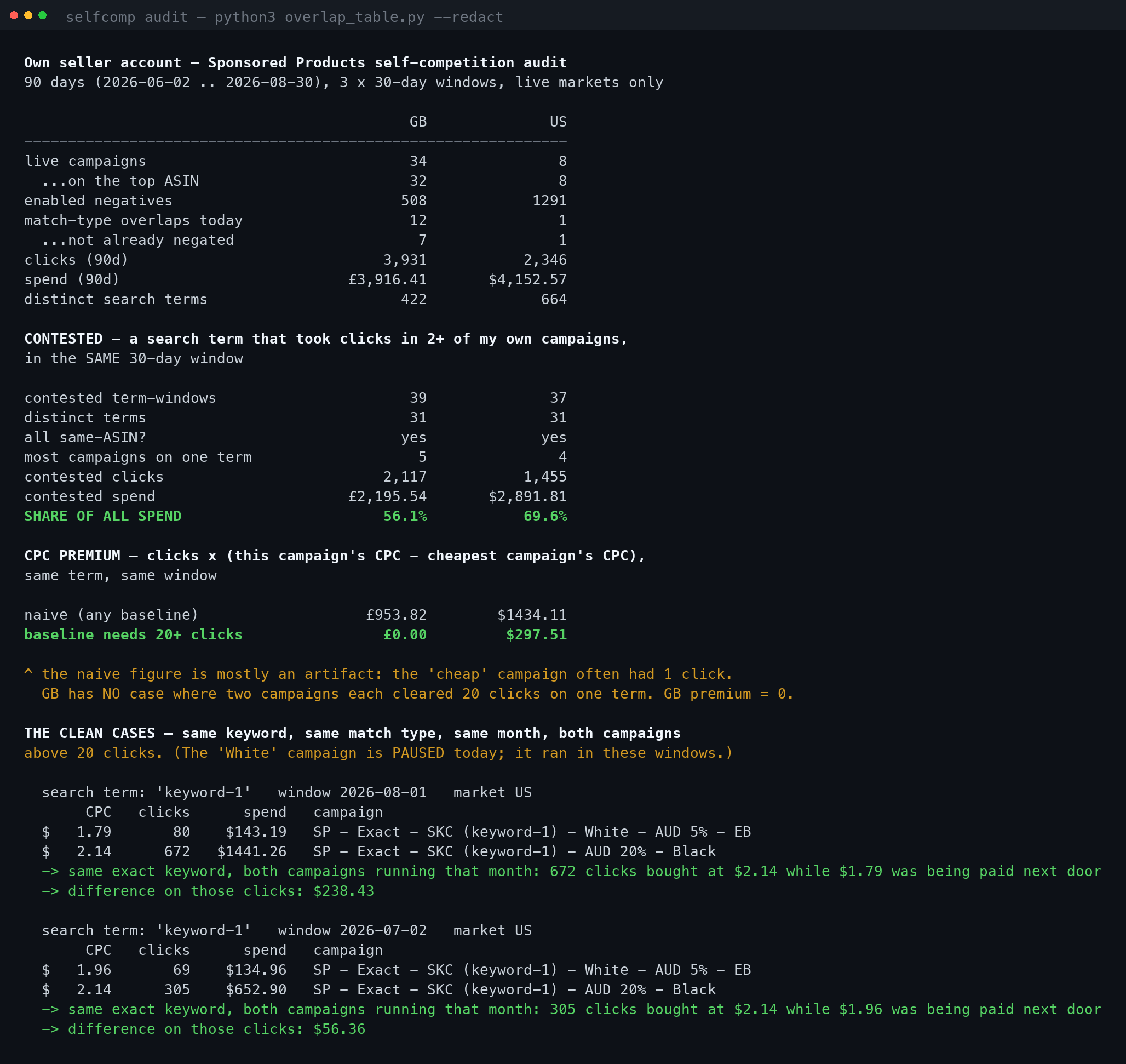
Then, from your search-term reports, it finds every term that took clicks in two or more of your own campaigns inside the same 30-day window, and shows what each campaign paid.
What it looks like
Read the premium honestly
The script prints two numbers for what the overlap costs, and the second one is the real one.
premium, naive                      1,433.14
premium, baseline needs 20+ clicks    297.51   <- trust this one
Premium is clicks × (this campaign's CPC − the cheapest campaign's CPC) for the
same term in the same window. The naive figure will happily use a campaign that got
one click as the cheap baseline. One click at $0.80 is not evidence that 700 clicks
were available at $0.80. The second figure ignores any baseline campaign under the click
floor.
On my own account that correction mattered more than the finding. It took the number from $1,433 to $297 in one marketplace — and from £954 to zero in the other, where no search term had two campaigns each clearing 20 clicks. If your two numbers are far apart, your overlap is real but too thin to price. Better to know that before you reorganise an account over it.
What this does not prove
It does not prove that two of your ads entered the same auction. Amazon serves one ad per advertiser per query, so the popular version — "you're bidding against yourself" — is not what the data shows. What it shows is how much of your spend lands on terms several of your campaigns chase, and how far apart the prices you paid were. That is enough to act on, and it survives someone knowledgeable pushing back on it. The stronger claim does not.
Runbook
Two ways to do this. Same script, same result.
If you already have Claude Code, you do not need to read the rest of this page. Open it in any folder, paste the prompt below, and answer its questions.
It will fetch the script, read it back to you before running it, find your Ads credentials without printing them, run the fast structural scan first, and only request reports once you have said yes.
Audit my Amazon Ads account for self-competition — places where two of my
own Sponsored Products campaigns chase the same customer search term.

1. Download this and read it before running anything:
   https://www.databaaba.com/static/downloads/selfcomp_scan.py
   Confirm it only reads — list calls and report requests to
   advertising-api.amazon.com, no writes. Stop if that is not true.

2. Find my Amazon Advertising API credentials. Look for ADS_CLIENT_ID,
   ADS_CLIENT_SECRET and ADS_REFRESH_TOKEN in my environment or .env
   files, or a client_id / client_secret / refresh_token trio in an Ads
   API config in one of my projects. Tell me which file you used — never
   print the values. If you cannot find any, say so and stop.

3. Run: python3 selfcomp_scan.py --profiles
   Show me the marketplaces and ask which one to audit. The UK is in
   EU, not NA.

4. Run --structure-only for that profile first. Walk me through the four
   overlap tiers, and be explicit about which tier-2 overlaps are NOT
   already blocked by my existing negatives.

5. Ask me before the full scan — it costs report requests. Then run it
   with --days 90.

6. Interpret the result:
   - Use the "baseline needs 20+ clicks" premium. Ignore the naive one.
   - If the two figures are far apart, tell me the overlap is real but
     too thin to price, and that I should not reorganise over it.
   - If the robust premium is zero, say so plainly. That is a valid
     result, not a failure.

7. Give me a table of which negative keyword to add to which campaign,
   ordered by how safe the change is. Do not make any changes — I will
   apply them myself.
The prompt tells it to read the script to you first on purpose. Never run something off the internet — mine included — without looking at it.
Then, once you have the findings
A second prompt worth having, after you have decided what to change:
Take the negatives you just recommended and give me a Sponsored Products
bulk operations sheet that adds them. One row per negative, campaign-level
where the overlap is campaign-wide and ad-group-level where it is not.
Show me the sheet before writing the file, and remind me that bulk uploads
apply immediately — there is no dry run.
No Ads API credentials yet? The scanner cannot help until you have them — it talks to the API, not to Seller Central. They come out of Amazon's Ads API onboarding, and approval takes a few days. Switch to the for what you will need.
1. Credentials
Amazon Advertising API credentials for your own account. If you already run any Ads API script you have all three; if not, they come out of Amazon's Ads API onboarding.
export ADS_CLIENT_ID='amzn1.application-oa2-client.xxxx'
export ADS_CLIENT_SECRET='xxxx'
export ADS_REFRESH_TOKEN='Atzr|xxxx'
Put those somewhere you do not commit. A refresh token is a standing key to your ad account.
2. Find your profile
python3 selfcomp_scan.py --profiles
One profile per marketplace. Note the ID and its region: NA is US, CA, MX, BR;
EU is UK, DE, FR, IT, ES, NL, SE, PL, BE, IE, AE, SA; FE is JP and AU.
The UK sits in EU, not NA — this catches everyone once.
3. Look at the structure first
python3 selfcomp_scan.py --profile 1234567890 --region NA --structure-only
Under a minute, and it uses no report quota.
4. Price it
python3 selfcomp_scan.py --profile 1234567890 --region NA --days 90
Amazon generates search-term reports asynchronously, so expect a few minutes of waiting — the script polls and tells you where it is. You get a JSON with everything and a CSV of contested terms for a pivot table.
5. What to do about what you find
In order of how safe the fix is:
- Tier 2, un-negated. Add the exact term as a campaign negative exact in the broader campaign. This is the closest thing to free money here — it sends the term to the campaign you tuned for it and stops the broad campaign buying it at a price you never set.
- Tier 3. Negate your live manual exact terms in the auto campaign. Auto is for discovery; once a term is proven and has its own campaign, auto should stop buying it.
- Contested terms where two campaigns each carry real volume. Decide which campaign owns the term and negate it everywhere else. Ranking is per-campaign, so consolidating usually beats splitting.
- Tier 4. Two variants on one keyword is sometimes deliberate. Check conversion rate per variant before you cut.
- Tier 1. Rare, and obvious. Pause one.
Change one thing at a time and re-run in a fortnight. An account this tangled did not get that way in a week, and unpicking all of it at once leaves you unable to tell which change helped.
Got a number that looks wrong?
I build Amazon SP-API and Ads API integrations for a living. If the scanner finds something you want a second pair of eyes on — or you would rather this ran on a schedule against every account you manage — that is the kind of thing I do.