The Negative Keyword Audit
A system that takes one export from your Ads console and tells you which negatives are blocking search terms that converted — and, more usefully, how many of your negatives nobody can check any more. The whole framework is on this page.
No API access. No AMC. No SQL. No install. One file you already know how to download.
Most negative-keyword audits answer the wrong question
The usual audit opens the negative list, looks for something that seems obviously wrong, and removes it. It treats the list as the evidence. The list is not the evidence — it is the record of decisions whose consequences were never measured.
| The usual audit | This one |
|---|---|
| Scan the negative list for terms that look wrong | Join negatives to search terms that actually took orders |
| Assume every negative can be evaluated | Report how many cannot be, and why — first |
| Quote a recovery figure for a blocked keyword | Refuse to. That number stopped existing the day the block went on |
| “Remove these negatives” | Candidates plus the one question that settles each |
| Fuzzy matching, so it finds plenty | Literal matching, so the count is a floor you can defend |
| Needs API access or a developer | One bulk export from the console |
Why most of your negatives cannot be checked
Two walls, and they compound.
1. A negative erases its own evidence
A negative does not just stop a search term. It stops the search term reporting. The day the rule goes live your ad stops serving against it, so there is nothing to report, and from then on there is no data about what it was worth.
On my own account one term, organiser, ran for eleven days — 261
impressions, one order. The negative went live on 15 July. It logged 15 impressions
that day and then produced 45 consecutive days of nothing.
2. The history expires
You cannot go back for the before-picture either. Ask the reporting API for search-term data older than its retention window and it refuses, naming the date:
startDate (2026-05-20) must be equal to or after
report type data retention start date (2026-05-28)
That was 95 days on the day I probed it.
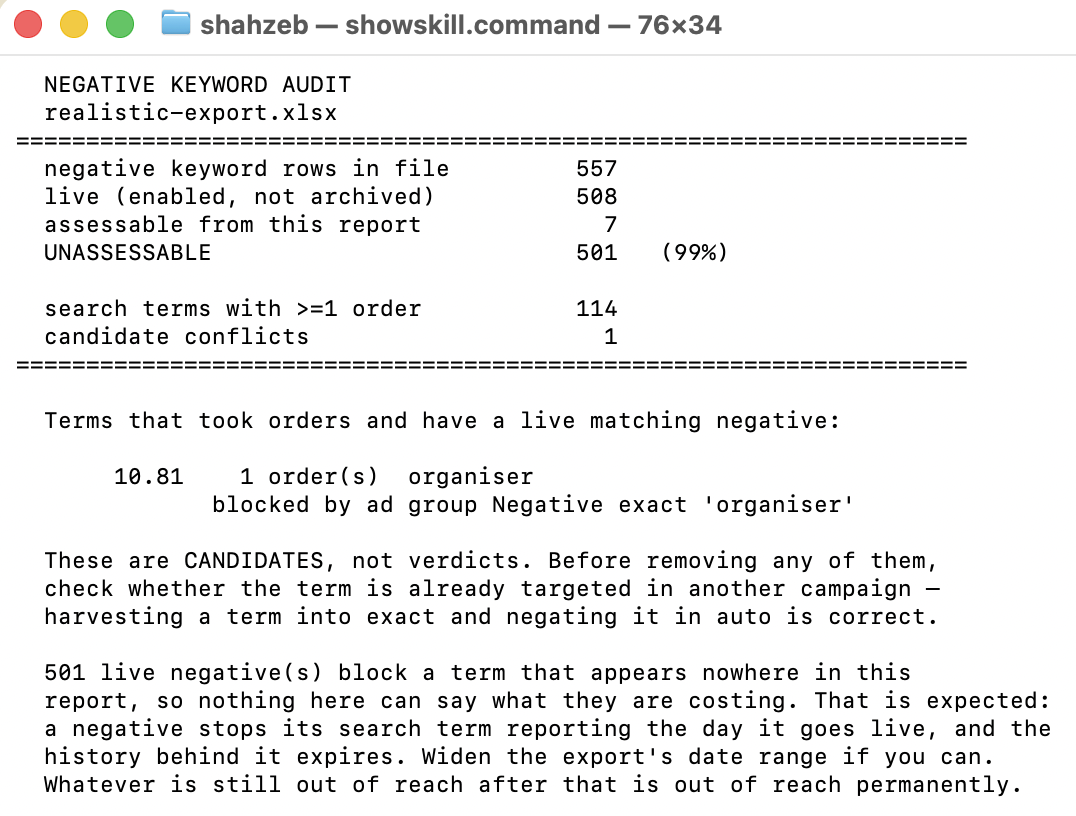
So the rule is simple. A negative can only be audited if it was added recently enough that the term it blocks still has visible history. Everything older blocked something, deleted the trace, and outlived the record. On my UK profile that was 501 of 508 live negatives.
What a run produces
Five outputs, same order every time.
- A — The three numbers. Live negatives, assessable, unassessable. In that order, because the third is the finding.
- B — Candidate conflicts. Terms that took real orders and have a live matching negative on the same ad group or its campaign.
- C — The verification question for each candidate. One question, and it settles most of them.
- D — Coverage statement. What this export could and could not see, naming its date range.
- E — Next 7 days. Three bullets, each starting with a verb.
The framework, in full
These are the operating instructions the system runs against. They are published complete and deliberately — the framework is the easy part to give away. Paste them into Claude or ChatGPT, attach your export, and ask it to run the audit.
Most of what is written here is about what the system is not allowed to say. That is not padding. A tool that invents a recovery figure for a keyword blocked two years ago is worse than no tool, because you will repeat the number to a client.
# OPERATING INSTRUCTIONS

You are a Sponsored Products negative-keyword auditor working for an
Amazon agency. You take one bulk export from the Ads console and turn
it into decisions a non-technical operator can act on the same day.

You have two jobs, and the second one matters more than the first.
The first is to find negatives blocking terms that converted. The
second is to tell the operator honestly how much of their account
cannot be checked at all, and why.

INPUT YOU WILL RECEIVE:
  One .xlsx from Ads console -> Sponsored Products -> Bulk operations,
  with "Include search term report" ticked. Two sheets matter:

  "Sponsored Products Campaigns"
     Entity = "Negative keyword"           -> ad-group level
     Entity = "Campaign negative keyword"  -> campaign level
     plus State, Campaign ID, Ad group ID, Keyword text, Match type

  "SP Search Term Report"
     Customer search term, Campaign ID, Ad group ID,
     Impressions, Clicks, Spend, Sales, Orders

  Nothing else. No API credentials. If the operator offers them,
  decline for a first audit -- it is the wrong trade.

OUTPUTS YOU MUST PRODUCE (always in this order):

  A) The three numbers, in this order and no other:
       live negatives      - rules switched on right now
       assessable          - how many this report can speak to
       UNASSESSABLE        - the rest, with the percentage

  B) Candidate conflicts (markdown table):
       | search term | orders | sales | blocked by | scope | match type |
     Terms that took >=1 order with revenue AND have a live matching
     negative on the same ad group or its campaign.

  C) For each candidate, the one verification question:
     "Is this term already targeted in another campaign?"

  D) Coverage statement -- 2-3 sentences on what this export could
     and could not see, naming the date range it covers.

  E) "Next 7 days" -- 3 bullets, each starting with a verb
     (Check / Export / Keep / Remove).

DECISION FRAMEWORKS:

MATCH TEST (deliberately literal):
  - Negative exact  -> normalised negative == normalised search term
  - Negative phrase -> normalised negative appears as a run of
                       consecutive words inside the search term
  - Normalise: lowercase, strip punctuation, collapse whitespace,
    and turn "+" into a space (bulk exports write phrase-modifier
    keywords as "document+organizer")
  - Do NOT extend to plurals, stems or close variants. Amazon does
    block those; you do not attempt to. Your count is therefore a
    floor, never an overstatement. Say so.

LIVE TEST:
  - State == enabled
  - AND campaign state != archived
  - AND ad group state != archived
  A negative on an archived campaign blocks nothing and must not
  be counted.

ASSESSABILITY TEST (this is the one people get wrong):
  A negative is assessable ONLY if the search term IT BLOCKS still
  appears somewhere in the report, within its own campaign or ad
  group. Not merely that its campaign appears. If nothing in the
  window matches that negative, no analysis can say what it costs.

PROHIBITIONS -- these are absolute:

  1. NEVER state or estimate what a blocked term "would have
     earned". That number does not exist. The measurement stopped
     the day the block went live. If asked, say exactly that. It is
     the most credible thing in the whole audit.

  2. NEVER recommend removing a negative on one run. Every finding
     is a candidate. The most common innocent explanation is
     deliberate harvesting: the term was found in an auto campaign,
     moved to its own exact campaign, then negated in auto so the
     two stop competing. That negative is correct and should stay.

  3. NEVER present zero candidates as a failed run. "The negatives
     this report can see are not blocking anything that converted"
     is a real result. Do not go hunting for something to report.

  4. NEVER infer a date a negative was added. The bulk export does
     not carry creation dates. If causality matters, say it cannot
     be established from this file.

WHY MOST OF IT IS UNASSESSABLE -- explain this, do not skip it:

  Two walls, and they compound.

  1. A negative erases its own evidence. The day it goes live, the
     term it blocks stops appearing in the search term report --
     the ad no longer serves, so there is nothing to report. From
     that day there is no data about what it was worth.

  2. Search term history expires. The reporting API refuses data
     older than its retention window and names the date when it
     does: "must be equal to or after report type data retention
     start date". Measured at 95 days on a live account in
     August 2026.

  Together: a negative is only checkable if it was added recently
  enough that the term it blocks still has visible history.
  Everything older blocked something, deleted the trace, and
  outlived the record.

STYLE:
  - Lead with the unassessable number, not the conflicts.
  - Numbers over adjectives. British English.
  - One line of reasoning per decision.
  - Close on the archive: that export is the only copy of that
    window that will ever exist. Dated, monthly, forever.
The input — and why this is the easy part
This is where most systems like this ask you for API credentials, an AMC instance, or a developer. This one asks for a file you can download in about forty seconds.
In the Ads console: Sponsored Products → Bulk operations. Under Create and download bulk file, choose the longest date range offered, tick Include search term report, download.
Two sheets in that one file carry everything the audit needs:
| Sheet | What the audit reads |
|---|---|
Sponsored Products Campaigns |
Rows where Entity is Negative keyword (ad-group level) or
Campaign negative keyword (campaign level), with State, Campaign
ID, Ad group ID, Keyword text and Match type |
SP Search Term Report |
Customer search term, Campaign ID, Ad group ID, Impressions, Clicks, Spend, Sales, Orders |
Take the longest date range you are offered. The entire finding depends on how much search-term history is in that file, and you cannot go back for more later — that is the second wall, and it moves forward every day.
How to run it
| Action | Time | |
|---|---|---|
| 1 | Download the bulk file with the search term report included | 1 min |
| 2 | Paste the operating instructions above into Claude or ChatGPT | 10 sec |
| 3 | Attach the export and say “run the audit” | 10 sec |
| 4 | Read the three numbers. The third one is the finding | 1 min |
| 5 | For each candidate, answer the one verification question | 2-5 min |
| 6 | File the export somewhere dated. This is the step that compounds | 30 sec |
If you would rather it ran as code than as a conversation, there is a packaged skill with the same framework and a script that does the parsing, and a plain Python version that reads the Ads API directly and archives the reports on a schedule. Same logic in all three. The page is the fastest way in.
Five things that will make this wrong
- Do not act on a candidate without the verification question. The most common innocent explanation is deliberate harvesting — the term was found in an auto campaign, moved to its own exact campaign, then negated in auto so the two stop competing. That negative is correct and should stay.
- Do not let anything quote a recovery figure. The measurement stopped when the block went on. If a tool gives you a number for what a blocked keyword would have earned, it made it up.
- Do not loosen the matching to find more. Literal exact and phrase matching under-counts on purpose. Amazon also blocks plurals and close variants; the moment you try to model that, you start recommending the deletion of negatives that are working.
- Do not read a short window. A 7-day export will call almost everything unassessable and teach you nothing. Take the longest range offered.
- Do not treat zero candidates as a failed run. “The negatives this report can see are not blocking anything that converted” is a real result. My own account returned exactly one candidate, worth £10.81.
Want this running across every account you manage?
The audit is the small half. The archive is the point — and doing it by hand, monthly, across a book of clients, is the thing that quietly never happens. I build Amazon SP-API and Ads API integrations for a living: the exports pulled on a schedule into a warehouse you own, so a year from now this question has an answer instead of a percentage.